Kirsle.net
In 2024, after I accidentally spilled a whole cup of coffee over my old Dell XPS laptop, I was suddenly in the market for a new computer and I picked up a 13" Apple Macbook Air M3. It was my first Apple computer in a very long time (before that I had an old Intel Macbook Air from ca. 2013), and having a macOS computer enabled me to finally debug and fix WebRTC errors in my chat room, but I was also greatly looking forward to Asahi Linux adding support for Apple Silicon M3 computers so that I could eventually install Linux onto this device some day.
At the time, Asahi Linux had support for M1 and M2 Apple Silicon devices so I thought it'd be maybe a year or so until M3 was supported. It took a little while longer than that, but as of this month they have released M3 support and I went ahead and installed it. It was quite easy to set up with their automated installation script.
There seem to be just a couple of issues they are still working out, which they mention in that blog post but briefly they are:
Suspend doesn't seem to work yet because they are still finishing DCP support (something to do with the DisplayPort video hardware -- external USB-C monitors might not be working either).
Edited to add what this looks like in practice. When I close my Macbook's lid, Linux doesn't react at all. The display doesn't turn off, and the screen doesn't lock, it just doesn't know the lid was closed. And when 'power saving' kicks in and the screen goes black, the backlight stays on so the screen is lit up with an all-black image. Touching the trackpad or any key causes the lock screen to display, but the display doesn't ever switch completely off. For now, this has me worried for the added power draw and longevity of the display hardware so I think I will just shut my Macbook down overnight when I'm not using it.
They might have more work to do with the GPU and so 3D graphics might not be performant. I am very used to basic laptops with Intel video cards anyway, so I'm not too concerned about this - the GNOME Shell desktop performs OK for regular day-to-day work.
Display brightness can't yet be adjusted (seems related to the DCP support). It seems the last brightness setting from MacOS is used in Fedora.
They say the camera should be supported but it doesn't seem to work for me. The green LED comes on but GNOME Camera and Firefox can't actually get a video feed out. (My old 2013 Macbook Air had no camera working either, because it was wired as a PCIe device rather than USB and there weren't any Linux drivers for that).
The most pressing matter for me, though, is that the Asahi Linux installer (still) doesn't provide an option for full-disk encryption with LUKS. I consider disk encryption to be an absolute must-have especially for small, portable, easily stolen devices such as a laptop. This poor guy on Hacker News learned this the hard way when his Macbook Pro running Asahi Linux was stolen, and without the disk encryption, the thief got his files and decided to blackmail him for profit.
While they have an open feature request to add LUKS setup to the installer, in the meantime it is possible to encrypt Asahi Linux separately, if a little involved.
Here is what worked for me in Sept. 2026.
In the tech industry, a "Full Stack Software Engineer" is somebody who is single-handedly capable of writing all of the source code needed for an application (especially in the context of web applications). That is, they are able to develop both the 'Back End' code (the part that runs on the server side, which handles your business logic, databases, authentication & security, API, etc.) as well as the 'Front End' code (the user interface that your customers will see: like a website's layout, design and controls).
Some Full Stack Engineers also know about the DevOps or deployment side of things: how you actually take all that source code and deploy it to your production web servers, and make it scalable for thousands (or millions) of concurrent users and keep it all running smoothly and securely.
In my 18-years long career in professional software engineering, I had always been a Full Stack Engineer. I may have only began my professional career in 2008, at twenty years old, but I had already been writing software for much longer ago than that! Back when I was just a teenager in high school, I already had developed and released several open source projects and I had a handful of production websites already under my belt, including one time a full MySpace clone I had programmed when I was 16. So, by the time I entered the workforce, I already knew how to fully write & ship a production application all on my own: the back-end, the front-end, and the deployment to production -- the complete lifecycle.
In 2026, I took things a step further and successfully launched my own company to monetize one of my most successful side projects, taking my "Full Stack Engineer" title and expanding it to "Full Stack Entrepreneur!"
That is: I had single handedly built a whole entire product, all by myself, from scratch -- and I didn't even use A.I. to help me build it!
In this blog post, I link to a Live Demo Website where I can show off what I built and you can play around and explore it, as well as an Open Source version of my product so you can see some of my code. And then I will tell my story about how this project became successful enough to launch my own profitable company around it!
I've been a software engineer for basically my whole life, at least ever since I first taught myself to write HTML code when I was 12 years old, and in the modern era when Artificial Intelligence and Large Language Models are commonplace, I of course have adapted with the times, as I had done before whenever a new paradigm shift in the engineering landscape had come about.
In this modern era of A.I. vibe coded apps that get built and deployed while full of bugs and security holes, which then get trivially hacked in short order and the company's data all leaked online, I thought I'd write a little about how I, a career software engineer since 2008, approach the use of A.I. in my projects.
If you happen to be a junior developer just getting started in this space and relying heavily on A.I. to do most of your job, maybe reading about my approach to A.I. could be helpful to inspire you on a different way of doing it, and help you grow as a self-sufficient developer who uses A.I. only as a tool to automate the tedious parts but without it being a crutch that you rely on too heavily that you couldn't survive without it.
I taught myself everything I know about software development, and since 2008 I have been working professionally as a "full stack" software engineer.
In 2008 I was building web apps using Perl and old-school JavaScript (jQuery), and as my career progressed, I learned many other languages and frameworks, from Python to Go, Angular to Vue.js, I have used Amazon AWS and Google Cloud Platform, and outside of my day job I have always had many side projects and apps I built myself, and deployed them on my own servers and managed the complete end-to-end process all on my own.
Even while I was still in high school, I had written and launched many websites, custom blogs and forums, and even a MySpace clone, so by the time I was ready to enter the workforce at 20 years old, I already knew the full stack: back-end, front-end, deployment and systems administration.
All of that is to set the context of where I was coming from before A.I. came about.
For my personal taste, I have never wanted to have A.I. built directly into my code editor.
When GitHub Co-pilot came out and your code editor had A.I. built directly into it, I never touched that myself.
The only time that I had A.I. in my editor was when I was working at Meta from 2023-26. At Meta, they have a custom build of VS Code with a ton of proprietary plugins and integrations, and there was an A.I. built in, and it would've been more trouble to remove the A.I. than to just let it be.
I can see the appeal of it: at Meta I was building an internal app to manage licensed music and I was creating a data schema to store it, with fields like Title, Artist and Album. As I got started writing the first couple of fields, the A.I. automatically picked up what I was laying down and it suggested fields like ISRC, UPC, Copyright, Duration, Genre, and so on which were all fields I wanted to add and it was fun to be able to just hit "tab-tab-tab" and accept all the suggestions.
But again, for my personal taste I do not like having an A.I. in my editor. I don't want it inspecting my entire project's source code, I don't trust it to make large-scale refactors for me, I prefer to keep my separation of concerns and have A.I. over there and my code over here without the two directly inter-mingling.
The way that I utilize A.I. is to chat with it separately in my web browser, or more recently, locally on my PC using LM Studio.
One of the first things I found A.I. to be super helpful for was database queries. When I have a complicated question to ask of my database, I can open a chat session with an A.I. and tell it what I want to do, and briefly describe my tables and their relevant columns, and it gives me a custom tailored solution made specially for my exact use case.
For example, on a social networking site I built as a side project, I wanted to pull some high-level demographics data about my users, counting them by age ranges and genders, and also mix in some high-level statistics about the content that those users generated on the site. And I wanted all of this to be done using a single database query. There were many tables involved and many different questions being asked of my database at once, but I knew it was more efficient to let the database do this work rather than have my web app gather it the slow way by making many separate queries.
Before A.I., I would have had to search Google and land on StackOverflow pages where others before me were asking to solve similar problems. I would have to first read and understand the StackOverflow question, to judge if their database looked anything similar to mine, and then read through the many answers, some of which posed much more complex solutions than the others. Now, with A.I. I can just tell it what I want out of my database and what my tables look like and it tells me exactly how to do it.
The A.I. doesn't need to understand my entire codebase for this. When I was learning Rust recently, when my code wouldn't compile and my usual trial-and-error to satisfy the borrow checker wasn't working, I would open a chat with Gemini and tell it just enough context so it can help me sort out the problem. I'd paste my struct and trait definitions, and the function or piece of code where the error occurred, and it would teach me about why Rust was unhappy and how to fix my code.
And that brings me to the next point...
When A.I. does give me some code back, I don't simply copy and paste it into my project and call it a day. I study the code to learn from it, and I rewrite it in my own style. Since A.I. doesn't have my entire codebase for context, it doesn't know how I usually name my variables or how I like to write my code, but that isn't important.
I treat A.I. the way that I used to treat senior software developers back when I was learning how to code. I work with them collaboratively, in a chat context, to learn from them and not rely on the A.I. as a crutch.
After I had ChatGPT help me with some of those gnarly database queries I mentioned above, I started to learn what the general structure is, how I could compose multiple 'subqueries' or 'Common Table Expressions' and in the future I was able to write my own queries without asking the A.I. again for help.
A part of how I approach A.I. today actually began years back when the iPhone was first launched (ca. 2009).
Back then, I was living in Los Angeles and my friends had the iPhone and Google Maps for navigation.
One day, one of my friends had lost or broken their phone, and they were driving us somewhere and they had no idea how to get there and had to ask one of us to help navigate for them. This friend was born and raised in Los Angeles, it was their hometown, but they had already come to depend too heavily on GPS navigators to the point where they were utterly useless at navigating anywhere without it. And we weren't even driving anywhere crazy, we mainly all hung out on the west side (Culver City/Santa Monica), on streets that should be well-known to all locals.
I took it as an early warning that I would not let myself depend too heavily on GPS and let my mental maps in my head atrophy.
Whenever I am driving to a new location for the first time, for sure, I will use a GPS navigator to get there. If it's a one-off or rare trip, that's OK.
When I am driving to somewhere for the second, third or forth time -- if it's an important place like a new friend's house, for example -- I challenge myself to learn the route to get there. I may use GPS the first couple of times, especially if there are many different intersections and turns to make, but if I am still using GPS to get there after that, I consider it to be a personal failure.
And this is how I approach A.I. today. A.I. can be a very good teacher and it can give me custom tailored solutions to my problems, but I use it first and foremost to learn, I treat it like a knowledgeable friend who can teach me things and make me a stronger developer.
But if A.I. were to suddenly disappear tomorrow, I would still be a self-sufficient developer who can architect a full app end-to-end, and I would be a little smarter having had the help of A.I., but I don't rely on it as a crutch; I could really take it or leave it.
I have only sometimes asked an A.I. to fully create an app for me from scratch, the so called "vibe coding" way.
I don't have A.I. built into my editor, though, so it was a chat session from which I copied the code out and the A.I. helped get me started on my project.
I wouldn't blindly trust a fully A.I. generated app, though -- A.I. makes mistakes, and many startup companies had found out the hard way when they vibe coded a social media app which had no security at all and hackers then trivially leak all their customer data from unsecured data stores that had no credentials set at all. A.I. is good at giving you something that "basically works" and does what you said, but A.I. often doesn't care at all about security or doing anything the right way.
The kinds of projects I had vibe coded were for small personal things, things that I thought would be mildly cool to have but that I wouldn't want to sit down and make a whole big thing out of. For example, a personal app to help me cross-post to multiple social media apps like Bluesky and Mastodon at once. To build something like that myself, I'd have to sit down, write all the tedious boilerplate that any web app needs, read through the API docs of each platform, develop and debug and test it all the hard way, it might take me a week. Or I can ask A.I. to get me started with a full single page app which already "basically works" and has the correct API calls and everything, and then take it from there and review the code, polish it up, fix the inevitable bugs.
But I'm not deploying an app like that to production, especially if it's a much more involved app having a back-end and many more source files than a self-contained single page app would.
In summary, A.I. is useful as a learning tool and I think the best use case for it is to help grow your own knowledge. Treat it like your own personal tutor. When it helps you with your project, don't just copy and paste it and call it a day, but study the code, ask questions about it, use it as a learning exercise to help strengthen your own brain and grow as a person.
A.I. has massively improved my workflow and made me a faster developer, even while I keep A.I. in its own chat window and talk to it out-of-band from my project. I have always been a "fast coder" and, because I write my code from scratch, I am automatically mindful about what I'm doing and the security implications of my code.
A.I. can save me hours of time when it comes to the tedious things, like integrating a third-party API or giving me a skeleton template for a complex feature to build on top of, but I'm not relying on A.I. to the extent that I deploy a buggy and broken project for it or to where I would be lost without it in case A.I. were ever taken away from me.
In recent months as the true costs of A.I. are beginning to show, a lot of hosted A.I. services are going behind steep paywalls, and they're holding all of the junior developers hostage -- developers who got started in their career by using A.I. and they rely on it too heavily, in the same way that my friends in Los Angeles rely so much on their GPS navigators.
Like everything else, A.I. is a tool and it can be used in good ways or bad ways. Hanging your entire career on using A.I. in the wrong way, to the point that you become "locked in" when the A.I. companies enshittify their products (in the same way that Uber, AirBnb, etc. have gone), and having no choice but to pay them any amount of money they ask for, because you are so dependent on their product for your own livelihood, is not a good way to use A.I. in my very humble opinion.
Over the past couple of weeks, I decided I would get serious again about learning how to program in Rust and I have ported my chatbot scripting language, RiveScript over to Rust.
You can check it out on GitHub at https://github.com/aichaos/rivescript-rs
The Rust port is fully 'feature complete' to a similar extent that the JavaScript and Go ports are, including some optional features (kept in other Rust crates) that are similar to the extras that the JS and Go ports come with:
RiveScript is a scripting language for chatbots that I had invented in the early 2000's.
It can be used to program the classic sort of "canned responses" chatbot that was especially popular back then, where your chatbot needed to anticipate all of the questions a user could possibly ask up front and give a pre-programmed response back. It has nothing at all in common with modern LLMs such as ChatGPT, though, RiveScript could still be useful in 2026 when paired with an LLM, so that you can "hard-code" responses to important questions and guarantee that your chatbot answers them how you would like, before falling back to an LLM to handle everything else.
RiveScript itself is a lightweight library that just handles the chatbot scripting language, designed to be very easy for chatbot developers to integrate it into their custom programs. (For example, RiveScript doesn't come with LLM fallback support, but it's very easy to write a custom program of your own that could do that).
A simple example of its syntax looks like this:
+ hello bot
- Hello, human!
See its official website RiveScript.com for details!
The Rust port of RiveScript is interesting because RiveScript, when it first released in 2005 with the original Perl implementation, it used the file extension .rs to contain your chatbot's response data.
In 2013, a Rust language developer contacted me about changing my file extension because the upcoming Rust language used .rs for its source files, and RiveScript was causing some complications on GitHub and in code editors when it was being mistaken for Rust code.
So I had changed the official file extension to .rive but most of the RiveScript ports would read files with both .rs and .rive extensions (for backwards compatibility).
This is the first new official port of RiveScript I have written since 2015, so the Rust port will only consider .rive file extensions to be valid by default when loading your chatbot's brain.
The first proper programming language that I taught myself was Perl, and I taught myself to program specifically because I wanted to run these kind of chatbots on AOL Instant Messenger back in the day, and some Perl code to do so was the first thing I stumbled upon.
So, the initial version of RiveScript was written in Perl, as I used Perl for everything back then.
But, Perl was already starting to lose popularity even back then, and I wanted more people to be able to use RiveScript and make their own fun chatbots. So I personally ported RiveScript into several other programming languages: Java, JavaScript, Python and Go.
RiveScript.java was my first ever Java project, RiveScript.py was my first Python project, and the Go port was one of my first Go projects!
RiveScript made for a really useful library for learning the ropes with a new programming language, as a proper RiveScript port involves touching so many different features of a programming language: filesystem access, regular expressions, lists and hash maps, classes and interfaces.
I was given a very good tour of Rust during the development of this project!
The infamous Rust borrow checker was interesting as compared to the other programming languages.
For those who aren't familiar: Rust as a programming language doesn't have a 'garbage collector' to automatically reclaim memory when your variables go out of scope (the way that Python, JavaScript, Go, Perl, etc. all do), but also, unlike C or C++ which also have no garbage collector, in Rust you don't need to worry about freeing your own memory yourself either. In a C program, errors around freeing memory lead to all kinds of problems and vulnerabilities when it's done incorrectly: your program can either have a 'memory leak' if you fail to free your memory, or a security bug if you free memory incorrectly and then use it again later in your program.
Rust avoids all of those pitfalls of C with its borrow checker. You basically need to prove, at compile time, that all of your variables are being handled correctly: where were they declared, which function has access to them, which parts of the code are able to write to them? And when you have satisfied the compiler and your program actually builds, then you know confidently that it doesn't have memory leaks or memory-related vulnerabilities; Rust manages the lifetime and memory of your variables automatically, freeing their memory when it knows they are no longer reachable anywhere, and so on.
Coming from other programming languages like Go, where it's totally OK to pass a mutable pointer to my master RiveScript struct all over the place, in Rust I had to be a lot more deliberate about when the master RiveScript struct is mutable, who has access to it, what they can do with it, and so on.
This leads to a few interesting quirks that the Rust port of RiveScript has compared to the others:
In RiveScript (generally), there is a feature called 'Object Macros' where you can write custom program code to add dynamic behavior to your bot. For example, you can let a user ask "what is the weather like in Los Angeles?" and have the bot go and fetch that information from a weather API using a custom Object Macro function.
In all RiveScript ports, object macros are given two parameters: a pointer to the master RiveScript struct, and a string array of parameters given to the macro function.
The *RiveScript pointer is sent so that the function can get or set user variables or potentially mutate the inner state of your chatbot. In most programming languages, it's fine to pass mutable pointers around all willy nilly - the languages depend on the programmer to ensure any mutations are done safely (e.g., by protecting internal hash maps with a mutex). In Rust, you can not give a mutable pointer to multiple parts of your program at the same time.
So in the Rust port, object macro functions receive a 'Proxy' object instead: it exposes a subset of useful function calls from RiveScript that an object macro would commonly want to use, but it is not the literal same RiveScript struct that is running your chatbot. Reading user variables will pass through and read them from RiveScript, but setting user variables will have the Proxy keep a 'staged' HashMap of the pending changes. (If you set and then read the variable, you get back the recently updated 'staged' copy instead of the one from upstream).
After the object macro function returns, RiveScript takes the staged writes and commits them properly to storage.
As I was building and testing the Rust port, I came across a decades-old bug in RiveScript that affected the JavaScript, Python and Go ports!
In RiveScript, responses from your chatbot are grouped into "topics", where the default topic is named "random" and whenever a user is within a topic, the only triggers their messages may match are the ones written for that topic.
Here is a cheeky example of how topics could be used to 'punish' a user for using foul language with your chatbot:
+ [*] (list|of|bad|words|like|f bombs|goes|here) [*]
- Watch your mouth! I will make you apologize for using harsh language before we
  ^ can continue chatting any more. {topic=apology}

> topic apology

    // While in this topic, only these triggers are available to match.
    // The '*' trigger matches all possible messages when a more specific
    // trigger failed to do so.

    + *
    - Nope, apologize first before we can chat.
    - Say you're sorry so we can move on.
    - You offended me earlier, apologize so we can chat properly again.

    + [*] (sorry|i apologize) [*]
    - OK, I'll forgive you. Just don't let it happen again! {topic=random}

< topic
Anyway, in RiveScript it is possible for topics to "include" or "inherit" the triggers that belong to another topic.
> topic my_topic includes another_topic inherits a_third_topic
    // ...
< topic
The intended behavior is:
* then the inherited topic's triggers would be unmatchable, since they're all a lower priority than the included topic.The default example RiveScript brain that ships with all ports comes with an RPG demo that implements a basic text-based role playing game, featuring multiple scenes or 'rooms' and it uses these topic inheritance features to have common 'base commands' that are available in all rooms of the game.
However, in most ports of RiveScript (in JavaScript, Go and Python for sure), the RPG demo gets stuck at a certain point because of a subtle nuance in how topic includes were handled.
I had created a minimal test case that demonstrated where the bug happens:
> topic global
    + help
    - good luck
< topic

> topic mars includes global
    + breathe
    - can not breathe
< topic

> topic puzzle inherits mars
    + north
    - wrong

    + west
    - wrong
< topic

> topic puzzle1 includes puzzle
    + west
    - right!
< topic
When the user was in the puzzle1 topic and they typed "west", they ended up matching the "wrong" response from the > topic puzzle inherits mars topic, because puzzle1 includes puzzle and they had a duplicate trigger in both.
I was a bit confused to see this example was broken across 3 different ports of RiveScript. I thought: "surely, this demo did work at one time, back when I first added it!"
The original Perl port of RiveScript had the demo working correctly, which confirmed my suspicion.
The other ports of RiveScript had broken this example between 2012 and 2014, during the "v1.0" eras of the JavaScript and Python ports of RiveScript specifically.
In the original Perl implementation:
When triggers are sorted in memory, only their text contents were sorted and stored on an array.
The response data for those triggers were stored in a Hash Map, keyed by the trigger text and containing its responses.
When the user's message matched a trigger on the sorted list, its details were looked up in the hash map and handled from there.
However, this meant that 'duplicate' triggers would overwrite the key on the Hash Map. Sometimes, a 'duplicate' trigger is actually wanted, for example, if your chatbot has many "yes or no" questions that it could ask of the user, you may have many triggers to capture the user saying 'yes' but each trigger is linked to a different %Previous response from the bot.
In the Perl port, duplicate triggers with %Previous don't function correctly because of the Hash Map.
In the JavaScript and Python ports, I had (at some point between 2012-14) refactored the bot so instead of the Hash Map it would keep an array of all triggers with their responses, so duplicates were allowed and the %Previous case worked as expected, but it introduced the bug with topic includes/inherits.
The Go port (which was written the most recently) took inspiration from these ones and inherited the bug as well.
Now, the RPG Demo RiveScript code itself could have been rewritten to be more clear (using inheritance instead of includes to avoid the specific duplicate trigger), but given that the RPG Demo code existed for many years and it was once functional (still is for Perl, and once was for JavaScript and Python), I thought it best to actually fix RiveScript to make the demo work again.
So: when a topic 'includes' another and the two topics have an identical trigger, the first-party version belonging to the current topic will shadow the other one and take priority.
At the time of writing, the Rust port has this RPG Demo example working correctly, making the Rust port now even slightly more correct than the JavaScript, Python or Go ports!
I may update the other ports soon to backport the fix for them as well.
The below is all speculative and I'm not sure it will happen, but here are some possible future plans for RiveScript.
Apart from bug fixes in the current ports, any major new development (if it happens) I will only be doing in the Rust port.
Let me explain.
While RiveScript made for a very useful project for me, for learning the ropes with a new programming language by porting over a native implementation of RiveScript, this became a double edged sword over time for RiveScript itself. The Python and JavaScript ports had proved especially popular, and they received feature requests and actual code contributions from the community on GitHub. But RiveScript had to be slow to evolve because I wanted all 5 ports to be more or less compatible in their functionality. I couldn't commit to adding a big new feature to RiveScript itself unless I was prepared to implement that feature 5 different times in 5 different programming languages.
Over the years I had sometimes thought about what a "RiveScript 3.0" might look like. The current RiveScript language has a few pain points, with its syntax and features on the edge case, that could be improved upon. But I no longer have the motivation to maintain 5 separate ports (now six separate ones, with Rust added) for such an ambitious project.
A couple of the brilliant features of Rust, though, are:
Just about every programming language is able to link with C programs, so the above means that a library can be written in Rust and then have bindings created for JavaScript, Python, Perl, Go and so on which all use the Rust library via the C shared object API.
This is significantly better than my hopes for the Go programming language were: in Go, you can similarly compiled a Go program as a C shared object, however, because Go has a garbage collector, your C shared object brings along the full Go runtime environment. While a third-party program can link to a Go object, it can only do so one time, as adding a second Go DLL will cause the Go runtime to be added again and it will conflict with itself and blow up in your face. That all is not a problem with Rust crates compiled as C shared objects.
So if I find it a worthwhile endeavour to overhaul RiveScript, this is how I would basically want it to work:
rivescript3 and that would be the Rust binding (separate from the rivescript 2 library that already natively exists in some languages, which would still be around).Anyway, in the modern world with LLM chatbots like ChatGPT, I'm not sure the demand is so great for a classic "canned responses" type of chatbot anymore.
During all my years working on RiveScript, I saw two different waves of interest come and go around these kind of chatbots: they were booming in the early 2000's with AOL Instant Messenger chatbots such as SmarterChild, then it dulled down for a while until around 2012 when Facebook Bot Platform came about and people could program chatbots for FB Messenger (and Google/Microsoft had their versions). This was the era when the JavaScript and Python ports were especially popular. That hype again simmered down, and now we have LLMs which blow RiveScript completely out of the water.
One could still pair RiveScript with an LLM to get the best of both worlds (deterministic responses to important questions before falling back on the LLM), and RiveScript already would fit that niche well enough, so it may not be urgently needed to improve the quality of life for the RiveScript language itself.
Anyway, that's about all the news I have about RiveScript lately! Check out the Rust port if curious and let me know how well it works!
A discussion thread I got pulled into on Mastodon had me suddenly nostalgic for something we once had on the Internet, and which was really nice while it lasted: the Extensible Messaging and Presence Protocol, or XMPP, or sometimes referred to by its original name, Jabber.
What kicked off the discussion was somebody asking about a more modern "decentralized chat platform" known as Matrix (not the movie). A lot of people online talk about how they like Matrix, but I one time had a go at self-hosting my own Matrix node (which I feel I should rant about briefly, below), and the discussion turned back towards something that we used to have which was (in my opinion) loads better, XMPP.
So I haven't posted a good rant on my blog in quite some time - I had chilled out a lot in my older years, but I just have to tell this story about Safari and my struggles in getting it to work with my chat room I had built recently.
My chat room is a fairly basic app - it's open source and written "from scratch" using WebSockets to handle the client/server communication and they pass basic JSON messages around. All fairly standard stuff and shouldn't be a big ask for any modern web browser that supports modern web standards. It works flawlessly in Google Chrome as well as all other Chromium derivatives (including Edge, Brave, etc.), and it works flawlessly on Firefox, and when you run either browser on your Windows, Linux or Mac OS computer. It even works great on all Androids, too - using Chromium or Firefox browser engines.
But then there's Safari. Safari "supports" WebSockets but it doesn't do so very well and I've been fighting this for weeks now trying to chip away at this problem. Both when you run Safari on your Mac OS Ventura desktop or on your iPhone or iPad, Safari is very easy to overwhelm and it will disconnect from the chat room at the slightest hiccup of an issue.
My rant here actually is about three different problems that have made my life difficult trying to get Safari to work:
I don't own a Macbook or an iOS device and so would have no way to even debug or look into this problem, but at least there is an option to run Mac OS inside of a virtual machine (using something like OSX-KVM) so at least I can look into the desktop Safari browser and see what its deal is.
First - here is how my chat basically works: you connect, send your username to log in, the chat tells everyone you joined, sends everyone the new Who's Online roster, and sends some "welcome messages" to the one who joined where I can send my rules or new feature announcements to you.
What I would see when a Safari user logged in was: they'd connect, log in, receive all those welcome messages and then they would immediately hangup the connection and log off. On their side, the web browser gives a very unhelpful error message regarding the WebSocket:
Protocol error.
That's it - it doesn't say what the error was. Even when I have a Safari browser in front of me, they give me no help at all to find out what's wrong!
Through trial and error, I found out:
...and that kind of thoroughly sucks. I can remove all the welcome messages so as to allow Safari to at least log on, but then just one user posting a paragraph of text will kick all the Safari users out of the chat room!
Chrome and Firefox don't experience this issue. A while ago I added picture sharing in chat - you send your picture over WebSocket and it echoes it as a data: URL to all the chatters, passing those bytes directly back out; Firefox and Chrome can cope with this perfectly, but that would for sure kick Safari users off for too long of a message!
So, when it comes to Mac OS users I can tell them: Chrome and Firefox work better. But this advice does not fly on iPads or iPhones because, per Apple's rules, web browsers on iOS are not allowed to bring their own browser engines - they all are just custom wrappers around Mobile Safari.
And you guessed it: Mobile Safari doesn't like my WebSockets either!
I am hoping that with EU pressure placed on Apple to where they will allow competing browser engines to join their platform, that at least some of my iOS users will have a way to use my chat room. But how it stands currently is: iPads and iPhones simply can't use my chat room at all, or if they can get on (maybe it's the "too long of message" issue with them as well), they will be fragile and easy to boot offline just by writing too long of a message.
Apple will not innovate on Safari and make it support modern web standards, and they've made sure that nobody else can innovate either. The Blink engine from Chromium and Gecko from Firefox both work great with WebSockets and if only they were allowed to exist in their true forms on Apple mobiles, I wouldn't be ranting about this right now, I could just say "don't use Safari."
And side rant: the reason Apple won't allow Chrome or Firefox to compete with them is because they are scared shitless about Progressive Web Apps, which could compete with their native app store. They won't innovate on Safari at all until their feet are held to the fire (thanks for that as well, EU!), their web browser sucks (as this WebSockets thing illustrates), they're holding everybody back - the new Internet Explorer 6.0!
Even if I owned an iPad, it wouldn't help - you can't get to the browser logs on an iPad browser to even see what kind of error message it's throwing. Though I imagine the error message would be just as helpful as desktop Safari, anyway: "Protocol error."
In order to get logs off an iOS web browser, you need to pair it with a Macbook computer -- the only kind of device that is allowed to run the iOS development kits and is the only way to debug anything that happens on your iPad.
With Mac OS, at least there is a way I can spin up a virtual machine and get my hands on Safari. There is no way to do this for iOS. There's no virtual machine where I can run the genuine Mobile Safari app and have a look at this issue myself. I wish Apple weren't so closed in their ecosystem - comparing it to Android for example, you can debug an Android app using any kind of computer: Windows, Linux, Mac OS, even another Android, even on-device on the same Android.
I am not an iOS developer, I don't care to be an iOS developer, and I don't own any Apple hardware, and it really sucks when I run into a web app issue that should have nothing to do with Apple specific software, and I simply can not even get in and look at the error messages.
I'd been chipping away at this for weeks, basically blindly trying things and throwing shit at the walls and hoping one of my Apple using friends tries my chat room once in a while to see if any of my efforts have worked (spoiler: they haven't worked).
I've also tried reaching out to developers on Mastodon and other social media: my chat room is open source, could somebody with Apple hardware help me debug and see if they can find out what I can do better to get Safari to like my chat room. Maybe I didn't reach the right ears because I've gotten only crickets in response. Meanwhile about a third of my users still can not get onto my chat room at all.
Where I've landed so far is: it seems Safari can connect, but that < 500 character limit issue seems horribly broken and I don't want Safari users getting kicked off left and right by surprise, it's a bad user experience.
If I wait it out long enough (and if the EU is successful), Apple may permit actually good web browser engines on their platform and then my chat will work perfectly on them. It may just take a couple of years though - first Apple would have to be successfully sued into submission, and then Google/Mozilla would have to port their browser engines over which could be its own long tail of development work.
Maybe as a consequence of that regulation, Apple will actually put some new work into Safari instead of just neglecting it and they'll fix their shit. Currently it seems like my WebSocket messages need to be smaller than a tweet on Twitter, and it honestly won't be worth all the effort it would take me to reimagine my whole chat room and come up with a clever protocol to break messages apart into tiny bite sized chunks when it's only one, non-standards compliant web browser, which drags its stick thru the mud as badly as Internet Explorer ever did, that has the issue here.
So are they the new Internet Explorer, or somehow even worse?
I have sometimes had people visit my blog because they were Googling around in general about Apple and they like to fight me in the comments because I dissed their favorite brand. If this is you, at least say something constructive in the comments: have you ever built a WebSockets app and do you have experience to share in how to get Safari to behave? If you're simply an end user fanboy and never installed Xcode in your life, save your comments, please.
I'm announcing my latest open source project: a WebRTC chat room with asynchronous video support that I'm calling BareRTC. It is very much styled after the classic old-school Flash-based chat rooms that were popular in the early 2000's.
I have a demo of it available here: https://chat.kirsle.net/. I can't guarantee I'll be lurking in that room at any given time but you can test it out yourself on a couple of devices or send the link to some friends and see how it works.
Its primary features are:
The back-end is written in Go and it should easily install onto any server. With WebRTC, the webcam streams are peer-to-peer so you don't need a server in the middle to relay all that video bandwidth (which could be expensive!). Here is a screenshot from the source repo:
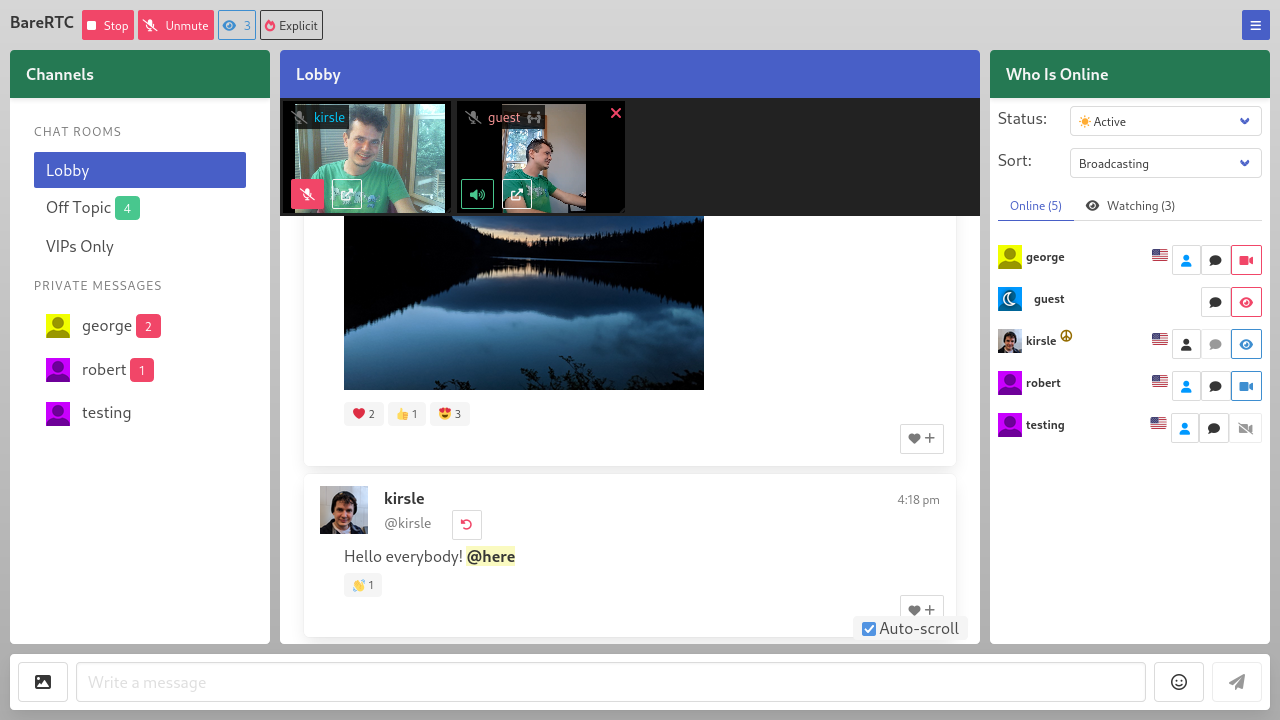
In this blog post I'll talk a bit about the technicals and difficulties I ran into getting this app to work.
One of my side projects is nonshy, a social networking site for nudists and exhibitionists. I wanted a chat room for it and I wanted it to work as described above: where some users can be on video but the room isn't all about video and is primarily a text chat room, as not everybody has a camera or the will to be broadcasting on it at all times.
I really expected that a chat room like this should have already existed out there as a free and open source project that I could plug in to my site. There were so many Flash-based rooms just like this in the early 2000's, and WebRTC is a standard web technology now, there are lots of open source apps and libraries that use WebRTC, but none of them worked like these classic old chat rooms did. Most WebRTC apps are in the style of Zoom or Jitsi, where it's expected that all users will be on video.
I didn't want to build my own chat room, but as there was nothing suitable for me to use I had to do it myself. It was a fun learning process to play with WebRTC for the first time.
My chat app now fills the void of such a thing not existing. I didn't want to build it specifically for my social networking site, so it's a stand-alone app that plugs in to any existing userbase by letting your existing site sign a JWT token to authenticate users in. With the JWT you can also convey a profile picture image, profile URL and admin/operator status to the user as they enter the chat.
I named it "BareRTC" for the punny word play: I was "grumpy like a bear" that I had to program this damn thing myself and for the play on words that the itch I was scratching was for a nudist website in particular.
WebRTC is a web standard that allows two browsers to connect to each other (peer-to-peer, ideally) and transmit arbitrary data between them -- usually, video and audio data. Most modern video apps including Zoom, Jitsi Meet, Discord and others are using WebRTC to get video chat to work in a web browser.
The great thing about WebRTC is that it's peer-to-peer so you don't need a server to relay video frames back and forth between users -- saving you a lot of money in bandwidth costs. WebRTC usually works even if both sides of the connection are behind firewalls (such as most home users with a WiFi router that uses NAT). In case neither side can connect to the other, "enterprisey" WebRTC applications will fall back on using a server in the middle to relay video frames back and forth (called a TURN server). My app does not support TURN servers yet, but peer-to-peer video usually works in "most" cases.
These are the things I learned along the way, as this is my very first WebRTC project.
First, the two web browsers need a way to negotiate how they'll connect to one another and what features they will support (data channels, video or audio streams, and which codecs to use with those, and so on). To handle this initial negotiation process, you need a signaling server which is just any server that can echo messages back and forth between the two clients.
My chat room (before adding video support) already had a signaling server: I am using WebSockets to handle the server side of the chat protocol. The web page front-end connects to the WebSockets server to log in with a username and send and receive chat messages.
So I have two users "alice" and "bob" who want to connect peer-to-peer and share video. I programmed my WebSocket server to also be the signaling server for WebRTC: Alice sends a message to my server meant for Bob and my server forwards it along, and the two of them share "ICE candidates" and "SDP messages" back and forth which is how they negotiate how they'll connect to each other (ICE) and what features they will support (SDP). This is the easy part of WebRTC: your back-end signaling server just gives them a method to relay these to each other and then the two browsers have everything they need to (hopefully) establish a peer-to-peer connection directly between themselves.
The part I was getting stuck on the most was that my chat room's video feature is asynchronous: one user is broadcasting a video, and the one who wants to tune in to that might not be broadcasting their own. I could see the ICE and SDP messages being sent between the two users but then nothing would happen: the receiving party was not getting the video streams sent by the caster.
But if the receiver was also casting their own video, the two could connect find and see each other's video!
I found out this is because in the SDP negotiation process, the one connecting (the "offerer") negotiates what features they expect to share, and if they are not sharing their video, they don't request video support; and so the "answerer", even though they added their video streams to the connection, their video is not actually delivered to the offerer.
The fix was that when you called createOffer() you had to say {offerToReceiveVideo: true, offerToReceiveAudio: true} and then all is well.
Update (June 21 2025): It was slightly more complicated for Safari browsers, which don't support the legacy WebRTC protocol. I have posted an update here that goes into how I fixed it for Safari, so definitely check that out!
A crucial part to my success building this app was this barebones WebRTC video chat demo.
It's only 119 lines of basic JavaScript code that quickly gets two browsers into a video call with each other. It uses a service called ScaleDrone for the signaling server (simple channel to allow the ICE/SDP messages to relay between the two browsers). I do not use ScaleDrone in my app but I could see how the JavaScript used it and have my own WebSocket server do the same for my needs.
Some of the quirks that I had to deal with comparing my app to this example were:
My chat room app is released under the GNU General Public License v3 and if you wanted a chat room like this for your website, you're free to check my project out! At some point I may put a mirror to my code on GitHub to allow social development and pull requests for others if you'd like to help improve the feature set.
Check out the source at https://git.kirsle.net/apps/BareRTC
I have just released a new toy program on my website: Error Message Generator 2.0, or ErrorGen for short.
ErrorGen is a simple program that lets a user configure customized error dialog pop-ups, with a custom icon, message and buttons, to prank their friends with or to put to good use by shell scripts if you want to ask the user a quick question from your external program.
My original ErrorGen was inspired by a web tool called "Atom Smasher's Error Message Generator" which would produce images of error dialogs that you could save to disk. My program, however, created "real" dialogs on your desktop PC that you could drag around the screen and interact with. The original version was written using Perl/Tk in 2006 and hasn't been updated a lot since - with the latest release built in 2008 for Windows XP and it hasn't aged well and doesn't run as easily on modern Windows anymore.
In 2022, Atom Smasher's page went offline and I have seen an uptick of interest in my old ErrorGen program ever since: it is recently the #1 most requested page on my website!
So, on January 21, 2023 I decided to reinvent my ErrorGen program from scratch, this time programming it in Go and to explore the Fyne UI toolkit which I had seen around but hadn't played with before. ErrorGen 2.0 has equivalent features to what my original Perl version had, but with a fresh and modern look based on Material Design that comes with Fyne and built for the modern era. I also have some plans to extend ErrorGen 2.0 with new features and especially make it more useful for command line interfaces, to make something on par with GNOME's Zenity tool.
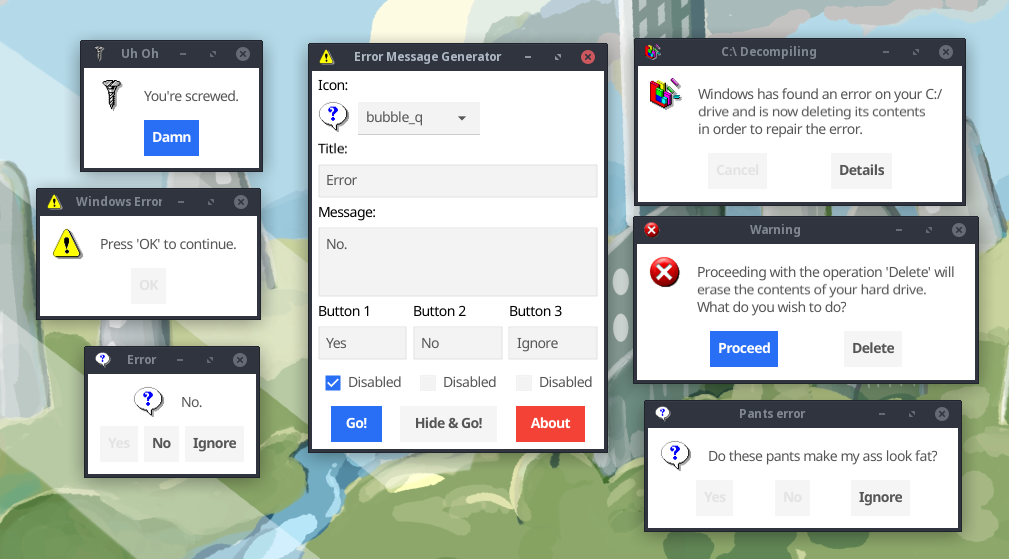
You can check out the new ErrorGen on my Error Message Generator page. The classic Perl version from 2006 is still available here if you want it.
Is Zenmsg a virus? asks:
It only opened a command box, and nothing else happened. Is this a virus?
No, it's not. 😊 ZenMsg is a command-line program (so it opens your DOS prompt if double-clicked on), but it requires command-line options to tell it what to do. When run without any options, it prints its usage information to the terminal and then exits; so when double-clicked on, your DOS prompt appeared and then closed because ZenMsg exited.
You'll want to run it from a PowerShell or Command Prompt window first (so that the console sticks around after the program exits), and you can see it just prints its usage information:
C:\Users\Noah\Downloads> ZenMsg.exe
Usage:
      ZenMsg [--error --alert --info --question]
             [--title] [--text] [--button label]
             [--icon name_or_file]
             [--default label] [--cancel label]
             [--disabled n]
             [--version] [--help]

    Use the "--help" option for more help.

(and it goes into detail on all the options)
If you call it with ZenMsg --help it goes into full detail (the same documentation that's in the ZenMsg.html page the program ships with), including all the names of built-in icons. Every icon available on the Error Message Generator is built in to ZenMsg, and you can point it to a custom image on disk to use your own icon:
BUILT-IN ICONS

Here is a list of all the built-in icons that you can use by name:

  aim_guy         - Blue AIM guy icon
  aol_icon        - Blue AOL icon
  attention       - Yellow triangle around an exclamation mark
  bomb            - Round black bomb icon
  bomb_dynamite   - Icon of a bundle of dynamite and a trigger
  bomb_grenade    - Icon of a grenade
  bulb            - White light bulb
  butterfly       - MSN Butterfly icon
  cake            - Slice of pink cake on a blue plate
  circularsaw     - Icon of a handheld circular saw
  control_panel   - Generic control panel icon
  cow             - Icon of a cow and a computer tower
  defrag          - Disk Defragmenter icon
  disk_blue       - Generic blue floppy disk icon
  disk_blue_label - Blue floppy disk with a label
  disk_orange     - Generic orange floppy disk
  disk_red        - Generic red floppy disk
  disk_red_label  - Red floppy disk with a label
  disk_skull      - Gray floppy disk with skull and crossbones
  disk_yellow     - Generic yellow floppy disk
  error           - Old-school X in a red circle error dialog icon
  error2          - Modern, shiny incarnation of an error dialog icon
  error3          - Beveled error dialog icon (like Windows XP)
  error4          - A red X icon
  file_cabinet    - File cabinet icon
  find            - Find Files icon
  floppy_drive    - Generic floppy drive icon
  fortunecookie   - Icon of a fortune cookie
  garbage_empty   - Empty garbage can
  garbage_full    - Bloated garabage can
  gun             - Icon of a revolver pistol
  hammer          - Icon of a hammer
  heart           - Icon of a shiny red heart
  help            - Old-school Windows Help icon
  hub             - Icon of a hardware hub of sorts (networking?)
  hwinfo          - Icon of a PCI device with blue "i" bubble above it
  ie5             - Icon of old-school Internet Explorer
  info            - Speech bubble with an "i" inside
  keys            - Generic icon of keys
  keys2           - Old Windows key icon
  keys3           - Generic key and padlock icon
  labtec          - Icon of a server or something?
  mac             - Striped colorful Apple logo
  mail            - Generic icon of an envelope
  mail_deleted    - Same envelope with a red X emblem in the corner.
  mailbox         - Mailbox with the flag down
  mouth           - Smiling mouth icon
  msdos           - MS-DOS icon
  mycomputer      - A "My Computer" icon
  mycomputer2     - A "My Computer" icon
  mycomputer3     - A "My Computer" icon
  newspaper       - Generic newspaper icon
  peripheral      - Generic computer peripheral icon
  plant_leaf      - A certain green leafy plant
  pocketknife     - A swiss army pocket knife
  question        - Icon of a speech bubble with a "?" inside
  radiation       - Yellow and black radiation symbol
  ram             - Icon of a couple sticks of RAM
  recycle         - Green recycle arrows logo
  recycle2        - Recycle arrows enveloping a globe of Earth
  scanner         - Generic scanner icon
  screw           - Golden screw icon
  screw2          - Gray screw icon
  setup           - Generic icon for "setup.exe" type programs
  skull           - Black skull and crossbones
  skull2          - Picture of a skull
  skull3          - White skull and crossbones
  tux             - Icon of our favorite Linux mascot
  tux_config      - Tux dressed up like a repairman
  ups             - Icon of an uninterruptible power supply
  zipdisk         - Icon of a single zip disk
  zipdisks        - Icon of numerous zipdisks
You can call ZenMsg from a batch file or any other program (e.g. a Python or Perl script could call ZenMsg.exe and send it parameters). For example, open Notepad and save the following as "example.bat" (with quotes, ensuring that it gets a .bat extension and not .bat.txt) and place it in the same folder next to ZenMsg.exe:
@echo off
ZenMsg --alert --title "Critical Error" --text "Now you've done it." ^
	--button "Ok" --button "Cancel" --button "Accept blame" ^
	--disabled 1 --disabled 2 > zenmsg-answer.txt

echo The user had selected:
type zenmsg-answer.txt
del zenmsg-answer.txt
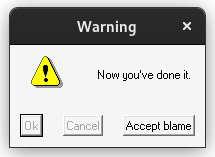
Double-clicking your example.bat file would then pop up that alert box. ZenMsg prints the user's selected button to its standard output, which we captured above by piping it into zenmsg-answer.txt (it's possible to get output from commands in e.g. Perl scripts too, so your program can ask the user a question and then have branching behavior depending on which button the user clicked on).
On forums like r/privacy people often discuss the role of open source software when it comes to privacy and end-to-end encrypted messaging applications. The general consensus is: a privacy focused app must be open source so that people can get their eyes on the source code and audit it for security vulnerabilities, verify it's doing what it says in the tin and without any secret government backdoors built in that would undermine the security and reveal peoples' private chats.
These are all well and good: if the source code is not open, you can't verify the code isn't doing something sneaky like uploading your encryption keys to the service provider or whatever. But, open source alone isn't a silver bullet to help guarantee the security of the app:
In this post I'll address a few common tired things I hear people on r/privacy say in regards to this topic and how it's never quite that simple.
0.0015s.