Kirsle.net
I blog about anything I find interesting, and since I have a lot of varied interests, my blog entries are kind of all over the place. You can browse my tags to sort them by topic and see which ones I frequently write about, or the archive has a complete history of my posts, dating back to 2008!
Besides my blog, I have pages for my creative projects, which are linked to on the navigation bar.
I write a lot about Linux and Android, Minecraft, and I like to rant about stuff. Generally anything that makes me curious. Also check out my Bookmarks for all sorts of cool websites about various topics I'm interested in.
For the geeks: this website respects your privacy and doesn't run any third party ads or analytics. This site speaks HTTP and doesn't require any JavaScript to work.
Name Server ExperimentFrom my end it appears nothing has broken yet, but while stuff is getting sorted out this site may be unresolvable at times. If I notice a significant drop in my daily unique visitors over a few days I'll revert to my registrar's name servers. ;)
Unix-like systems do have small amounts of malware out there, but they're more commonly called "rootkits" and they tend to take the form of backdoors and trojans left behind after a hacker has already taken control of your system remotely. Thus they affect server systems more than client workstations. For instance if a server allows root login over SSH, and the root password is weak, a hacker could get into the server and once there installs some rootkits to guarantee further access in the future, even if the sysadmin changes the root password.
For desktop users, the following are commonly cited as to why we're generally safe from viruses:
So for a user to get a virus via e-mail, they'd need to save the attachment to disk, then open its properties and change its permissions to be executable, and then double-click the file to run it (or, if they like the terminal, they'd need to cd to where they saved it, chmod it, and then execute it).
All of this eliminates the issue of accidentally executing e-mail attachments. If a user has to go through this much hassle to run a virus, they're more likely to think about it for a second and wonder how good of an idea it is.
Unix-like systems (including Mac) don't do this, and the user that you log on as for your day-to-day use doesn't have permission to do very much. You can download and modify things in your home directory and that's just about it. So, any programs you run are also stuck with these limited privileges. If you download an email attachment, give it executable permissions, and execute it, it's not gonna be allowed to do very much that you yourself aren't allowed.
Can it potentially get your saved passwords out of Firefox? Yes. So I wouldn't recommend trying to run things that are likely to be malicious. But can it affect your system as a whole? Can it get into other users' accounts and get their passwords? Can it infect your boot sector? No, no, no. They need root (administrative) privileges to do any such thing. If a normal user does run a malicious program, it's their own problem. Not like on Windows where it becomes everybody's problem because the system itself has become infected.
On Linux systems the user passwords are typically kept in the file /etc/shadow, and are encrypted using a one-way hashing algorithm. If a hacker has a hashed password, it makes it easier for them to crack it, because it takes out the element of having to go through another system to do so (for instance, brute force login attempts can be handled by the server locking out the account after enough failed attempts). If the hacker has the hash, they can do their own cracking "offline" and only bug the server again once they know the password for sure.
But /etc/shadow is owned and read-only for the root user. So, the regular limited user account that's executing a malicious program doesn't have permission to even read this file, so the program can't even get the hashed passwords out of it.
So to do anything administrative, a password is needed (either the user's password or, more commonly, the root password), and the malicious program couldn't possibly know what those passwords are, and if it were to try guessing, any decently configured system would start to get suspicious of it.
Thus it's highly difficult for a user-executed program to gain root privileges. Sometimes they're able to do it, but they usually need to think way outside the box and exploit security holes in running services to do so. But it's a major hamper in their ability to do any harm.
I'm first going to talk about package management systems in Linux. Most mainstream distributions (Fedora, Ubuntu, Mandriva, etc.) have package management systems that control installed software. The distribution's vendor maintains a default repository of available software. The majority of software a user would ever want is usually available in these repositories, from Firefox to OpenOffice all the way to development libraries like GTK+ and GStreamer.
This eliminates the user's need to surf the web and bounce from site to site downloading installers for everything. Most things are available in the software repository, and better yet, they're all cryptographically signed by the vendor, so you can be reasonably sure you're installing trusted, safe software.
But, not all Linux software is available in the repositories. For instance, Sun's VirtualBox. To get VirtualBox you go to its website and download an RPM or Debian package file and install it. To install it, you enter a password (yours, or root's). Then, at least on Redhat-based systems, RPM will complain that the package has not been cryptographically signed using a trusted key, and asks for a second password to be entered to verify that you seriously want to install this.
And this is the point I'm getting at: most Linux software that isn't directly located in one of your trusted software repositories, frankly, can't be trusted. Recent Redhat-based systems give you a second prompt if you attempt to install untrusted software.
So how can Linux viruses be downloaded? If the end user is apathetic and just types in their passwords whenever asked. They could download a package from some random website that appears legit, give their root password to install it, and at that point the package installer has administrative privileges to install that package however it wants.
The package could, for instance, install a binary somewhere, owned as root, and with permissions set in a way that, when executed, it runs with root privileges automatically, regardless of what user executed the binary. And in this way, if it were a virus, it would already have root access to the system, and could do whatever it wanted.
A malicious hacker could take an RPM package such as VirtualBox, replace the main binary with a "wrapper" program (which could launch a second "virus" program and then launch the legitimate VirtualBox binary), repackage it as a new RPM, and post it on a website promoting VirtualBox, saying the download is provided as a convenience to its users so that they don't need to go and download VirtualBox themselves. And since such a wrapper program would launch the legitimate VirtualBox app, most of its users would never know anything was amiss.
So long story short, computers are only as secure as their users are.
P.S. this could also happen to Mac OS X, but it requires less explanation; Mac doesn't have a central software repository full of cryptographically signed packages; they buy or download software the same as Windows users. But they still need a password for installation, so everything after that point still applies. Mac is still a Unix-like operating system.
(On that note, I'm working on researching stuff for a long article I wanna write concerning the sad state of Windows software and the philosophy behind it).
This is one of many cases where after getting into Linux and the open source world, I discovered some free/open source software that does things that I've always wanted to do. In this case, I discovered TiMidity, a MIDI to WAV converter.
TiMidity is used in Linux for support for the MIDI audio format. Rather than have actual hardware drivers to deal with MIDI directly (like Windows does), TiMidity just converts it into WAV format on-the-fly and sends it straight off to your audio hardware. This is its default behavior, anyway. Last night I was digging through its manpages and found out how to save the output as a WAV file instead of sending it directly to the speakers.
Thus, I finally was able to convert MIDI audio to WAV. For reference here's how to do it:
$ timidity -Ow -o output.wav input.mid
WAV files are big and bulky though, so that's where LAME comes in handy. Instead of saving the output to a file, we can pipe it into LAME and save it as an MP3 on the other side.
Thus, here's a one-liner for converting any MIDI file to an MP3:
$ timidity -Ow -o - input.mid | lame - output.mp3
There are Windows ports of these programs available too.
For now you can download it, or browse the source code and Javadocs, at /projects/Java/.
I started with Sun's tutorials, beginning with basic command-line apps to get the syntax down, then moving into the GUI tutorials with Swing. I'm not putting high priority on learning Java applet programming right at the moment, because nobody likes Java applets anymore.
And so now I'm at the point where I'm attempting to program my own things from scratch. A logical place to start was to create a Java class for the CyanChat protocol. The goal of it is to match the functionality of Net::CyanChat, and then one day I might even program a "Java CyanChat Client", to complement my current Perl CyanChat Client (and by Java CC Client, I don't mean an applet; the standard CyanChat client is an applet -- I mean a GUI application).
My CyanChat package is named org.kirsle.network.CyanChat for right now. Eventually I intend to program a RiveScript interpreter in Java, to open the door up to Java developers to get into the world of RiveScript (and because the only RiveScript interpreter currently in existence is written in Perl). Then, one of my goals in C++ is to compile a "RiveScript.dll" file, which can be dynamically linked with C/C++ programs or any other language that can dynamically link a DLL. :)
Since I'm serious about Java development, I made a nice lil avatar for Java-related blog posts, and spent more than 5 minutes creating it too.
Maybe they just want the links to be there for Google to see... to improve the page rank of their scam site so that it comes up higher in Google search results. They just want links from the forums they spam, not necessarily clicks.
Thus an interesting idea for web forum software: add a kind of restriction on link posting. Like how some forums require that you post 10 things that aren't spam before you're allowed to send private messages to other users, or other such arbitrary restrictions... what would be useful is one that goes: you can post links immediately after signing up, but every link you post will have rel="nofollow" attached to it, so that Google and other search spiders won't follow your link, and you won't get Pagerank credit for it. And then after posting enough on the forum, all your previous links and all future links will be linkable for search engines then.
Spam bots always seem to find ways to register and spam forums, but taking away their ability to get any Pagerank credit for their spamming would help fight back just a little bit.
/random thought of the day/
[noahp ~]$
Broadcast message from matts (pts/45) (Thu Jul 17 15:45:02 2008):

stop putting crap on this box, we're at 100% usage

Broadcast message from gregc (pts/2) (Thu Jul 17 15:45:50 2008):

Your wall message, dirties my screen

Broadcast message from matts (pts/45) (Thu Jul 17 15:46:08 2008):

good

Broadcast message from joels (pts/37) (Thu Jul 17 15:47:01 2008):

is this how wall works?

Broadcast message from noahp (pts/55) (Thu Jul 17 15:47:23 2008):

People, use /usr/bin/sayto >.<

Broadcast message from benl (pts/72) (Thu Jul 17 15:47:37 2008):

STOP WALLING ME!!111one

Broadcast message from matts (pts/45) (Thu Jul 17 15:47:45 2008):

there is no '*' option in sayto

Broadcast message from noahp (pts/55) (Thu Jul 17 15:48:01 2008):

Where we're going we don't need *'s

Broadcast message from carlof (pts/49) (Thu Jul 17 15:48:12 2008):

looolloololoolllool

Broadcast message from carlof (pts/72) (Thu Jul 17 15:48:13 2008):

oh hai
From: Samy <samy@...>
To: everyone <...>
Date: Thu Jul 17 15:51 2008
Subject: wall

Each time you wall on web11, you're disrupting 12 developers from working and possibly systems team or QA. Don't do this.
[noahp ~]$ wall
Don't be a jerk


Use hud, email, a phone, don't fing use this
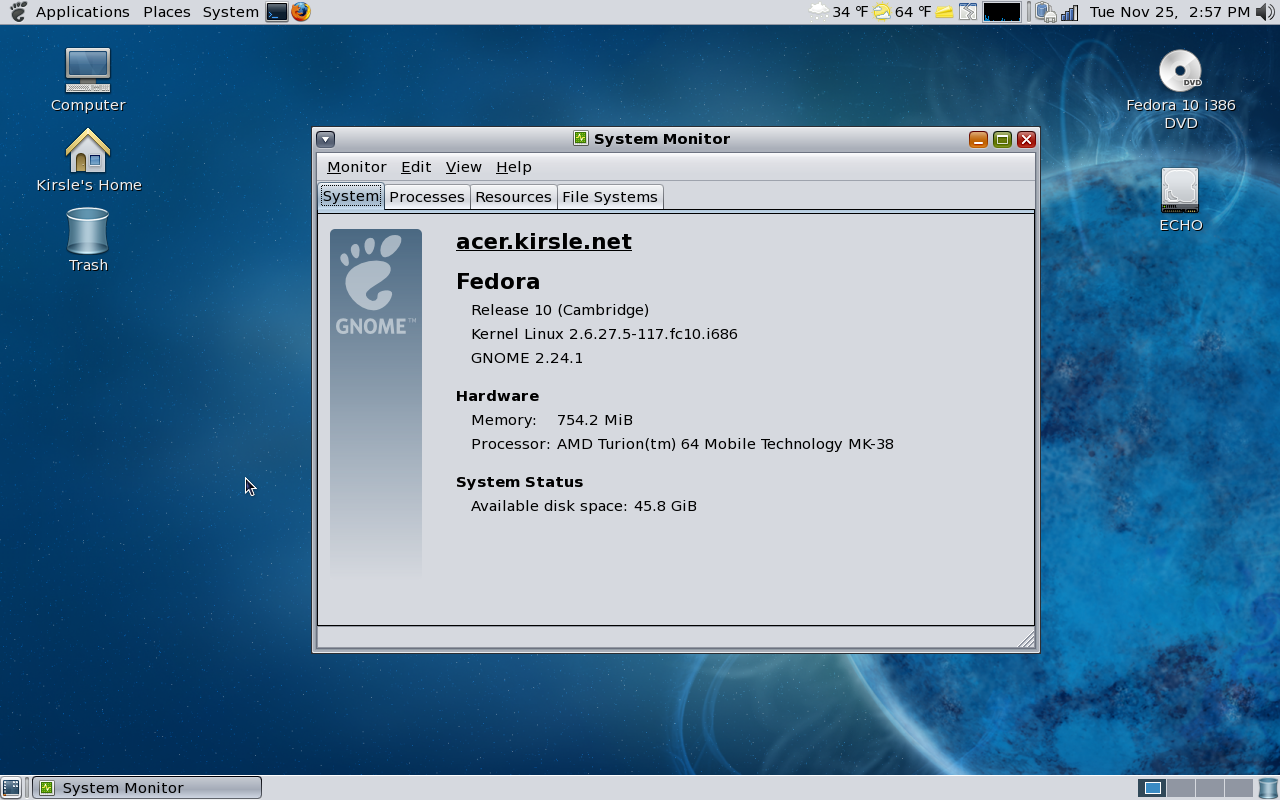
The most exciting thing about Fedora 10 for me is that my wireless card works now, just automatically. I installed it on my laptop, logged in, and before my GNOME panels even slid into view, the balloon from the network applet was already visible telling me there were wireless networks nearby. :-D So no longer do I have to fsck with the kernel or use MadWifi patches to get the wireless to work.
Also, Fedora 10 is just really pretty. I actually downloaded a leaked copy of the DVD image the day before it was officially released, to install it in a virtual machine and play around with it (I wanted to wait for it to be officially released so I could verify the sha1sum of the DVD image before installing it on any real PCs). On the virtual machine there was no graphical boot screen, only a text-mode one that had a text-mode progress bar at the bottom. But on my laptop the boot screen was pretty awesome. It had the supernova picture that's part of Fedora 10's theme and it had solar flare animations coming off it.
So, after installing it on my laptop, installing the OpenSolaris GTK+ theme, and tweaking some of my applets and panels the way I like 'em, here's a screenshot:
Current Mood: Excited like omg.
Right now, my page doesn't validate as HTML 4.01 Strict, because <script> tags aren't allowed to have a id attribute. What script tag has the ID attribute? The one to display the countdown until Fedora 10's release. If I remove the ID attribute, the script breaks. Nonetheless I'm going to keep it there only for the next three days until Fedora 10 finally arrives, then it's history and next time I want to count down until Fedora 11, I'll find my own implementation instead of pasting their awful HTML code into my otherwise perfect pages.
I've ranted about pasting external code into my site before, so I'll spare you any continued rambling for now. Sometime when I'm more motivated I might follow up on this rant with a sequel.
The moral of the story is, don't give me any code to paste anywhere in anything I have unless the code is completely valid and passes all validation tests (for HTML, that means it passes HTML 4.01 Strict standards).
Speaking of which, I wanted to say a little something about web development. Why have a degree in web design?, some people ask. Any 12-year-old can open Notepad and create a web page. I agree -- and I was that 12-year-old at one point in my life. What separates the men from the boys is the ability to create a web page that validates against the W3C's strictest standards. Yeah, any little kid can throw together a mess of HTML tags and get something out of it. They might even be lucky enough that their page works on every browser. But I've heard enough crying and complaining about how the W3C doesn't validate their page, how they get errors in the triple digits or worse whenever they try to validate their code.
So that's why web development is a skill and not a hobby. With the exception of the Fedora banner (which I highly regret embedding), all my pages on this site and every other site I develop, they all validate HTML 4.01 Strict. Not Transitional -- Strict. That means the W3C doesn't take any shit from my pages whatsoever. And that, my critics, is what sets me apart from the 12-year-olds with Notepad.
Then suddenly the girls come over and ask me if I'm 21 years or older. It was a weird question that I'd usually only expect to be asked at a club by people who don't believe I got in using a legitimate ID. But they were apparently looking for people to audition for Beauty and the Geek between the ages of 21 and 28 and they picked me to come in for an audition.
I've never actually watched the show but I've heard about it, and, while I'm a geek, I'm nowhere near the calibre of complete loser-nerd that usually appears on that show. I don't expect that I survived the audition phase, but I'm not really too concerned about it. I'm actually more worried what'll happen if I DO survive the audition, and how time-consuming doing the show might be and how it would affect my current job. Perl software developers are more valuable than developers of other programming languages because there's so few of us, so a Perl developer missing work is worse than, say, a Java programmer.
Anyway, the audition was earlier today at 10am in Manhattan Beach, at the Raleigh Studios. They sent me an e-mail with the necessary forms I had to fill out and some sample biography documents from former cast members. The sample bio they sent me seems to have been that of Tommy, from the 5th season of the show. They also instructed me to bring whatever geeky things I could... dungeons & dragons stuff, weird collections, awards for geeky things, etc. -- But, as I'm more of a computer geek than anything else, I didn't really have much to bring in, so I just decided to bring my Jr. High and high school spelling bee trophies, my "Best of Architectural Award" plaque from my senior year AutoCAD project, and a deck of Pokémon cards that I've owned since I was like 12 but which are still in good condition. I do play Dungeons & Dragons, but I don't own the figures or dice so couldn't bring any in.
Anyway, so I showed up at the studio. The parking garage was quite a walk away from the building I had to be at, and the route I took to the building took me along the backlot behind the studio buildings. Some of the studio doors were open and I could see inside, and see various sets for who knows what. One thing I saw looked like the back side of a living room set, possibly for a sitcom or something? I dunno.
I had arrived ridiculously early. The audition was at 10 but I left an hour early because of the notorious traffic on the 405, but, at that time of day the southbound traffic doesn't exist and I got there in a whole 5 minutes. So I waited up in the lobby of 3Ball Productions, who was doing the casting.
It was a long and boring wait. Finally the person to audition me arrived and we went into one of those audition/interviewing rooms (it's kinda a mini "set" in its own right... odd seating furniture and a camera pointed right at it). So she asked me some questions and had me answer in complete sentences because the video is going to be edited so her questions are cut out and ultimately it will turn into a quick 2 minute video to show to the producers. She asked questions about my background, what I did in high school, what my GPA was, what geeky things I'm into, what I don't "get" about girls, what kind of girl I like (seriously? this was some hard stuff to answer), etc.
(If I must pretend I'm into girls, then tomboyish girls are the ones for me. haha.)
And then 15 minutes later it was over. I headed off to work and went about the rest of my day.
If I don't hear from them by the 21st then it means I wasn't a finalist. (I don't expect to be contacted anyway). I did ask out of curiosity how their show works with people who have jobs. Apparently all the cast members have to live together in this mansion the whole time (or until they get eliminated), they shoot for 8 to 10 hours a day 5 days a week for 3 weeks, but weekends and off-camera time is free. So in the worst case scenario that they do call me, it would be theoretically possible to keep up with my day job at the same time. But I'd have to get some more clear and concise information and pass it by Samy. But, I really don't think I'll have to worry about any of this cuz I'm totally not THAT much of a geek.
So, I went today for the experience of seeing how exactly the audition for a reality TV show goes down and cuz I didn't know what I'd see or who I'd meet. I didn't meet anyone famous (so far as I know), just a bunch of people who work behind the scenes to make TV happen. It was cool either way.
So, thus concludes my crazy story of the last couple of days.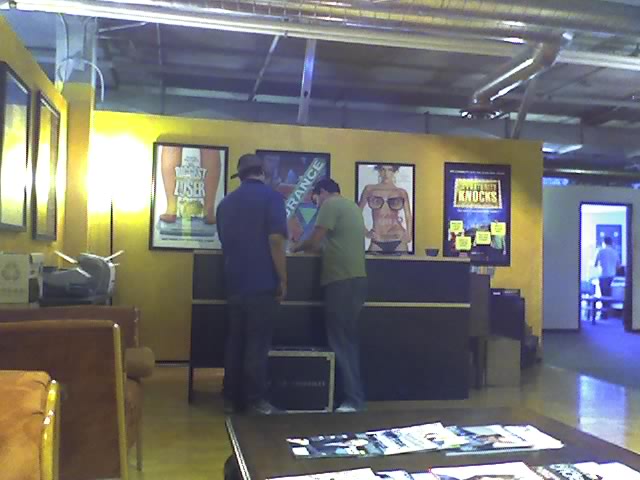
This is a picture I took of the room I was in.
Update [11/22/08]: It's the 22nd now and I haven't heard back from them. Darn. Looks like I'm not gonna be famous after all. But again, I don't care. I never anticipated that they would contact me. It does make for an interesting blog entry though, so I'd still recommend reading it if you haven't done so. :)
0.0015s.