Kirsle.net
In 2024, after I accidentally spilled a whole cup of coffee over my old Dell XPS laptop, I was suddenly in the market for a new computer and I picked up a 13" Apple Macbook Air M3. It was my first Apple computer in a very long time (before that I had an old Intel Macbook Air from ca. 2013), and having a macOS computer enabled me to finally debug and fix WebRTC errors in my chat room, but I was also greatly looking forward to Asahi Linux adding support for Apple Silicon M3 computers so that I could eventually install Linux onto this device some day.
At the time, Asahi Linux had support for M1 and M2 Apple Silicon devices so I thought it'd be maybe a year or so until M3 was supported. It took a little while longer than that, but as of this month they have released M3 support and I went ahead and installed it. It was quite easy to set up with their automated installation script.
There seem to be just a couple of issues they are still working out, which they mention in that blog post but briefly they are:
Suspend doesn't seem to work yet because they are still finishing DCP support (something to do with the DisplayPort video hardware -- external USB-C monitors might not be working either).
Edited to add what this looks like in practice. When I close my Macbook's lid, Linux doesn't react at all. The display doesn't turn off, and the screen doesn't lock, it just doesn't know the lid was closed. And when 'power saving' kicks in and the screen goes black, the backlight stays on so the screen is lit up with an all-black image. Touching the trackpad or any key causes the lock screen to display, but the display doesn't ever switch completely off. For now, this has me worried for the added power draw and longevity of the display hardware so I think I will just shut my Macbook down overnight when I'm not using it.
They might have more work to do with the GPU and so 3D graphics might not be performant. I am very used to basic laptops with Intel video cards anyway, so I'm not too concerned about this - the GNOME Shell desktop performs OK for regular day-to-day work.
Display brightness can't yet be adjusted (seems related to the DCP support). It seems the last brightness setting from MacOS is used in Fedora.
They say the camera should be supported but it doesn't seem to work for me. The green LED comes on but GNOME Camera and Firefox can't actually get a video feed out. (My old 2013 Macbook Air had no camera working either, because it was wired as a PCIe device rather than USB and there weren't any Linux drivers for that).
The most pressing matter for me, though, is that the Asahi Linux installer (still) doesn't provide an option for full-disk encryption with LUKS. I consider disk encryption to be an absolute must-have especially for small, portable, easily stolen devices such as a laptop. This poor guy on Hacker News learned this the hard way when his Macbook Pro running Asahi Linux was stolen, and without the disk encryption, the thief got his files and decided to blackmail him for profit.
While they have an open feature request to add LUKS setup to the installer, in the meantime it is possible to encrypt Asahi Linux separately, if a little involved.
Here is what worked for me in Sept. 2026.
In recent years, some new insights and research about the brain and mind have been making their way around the Internet and words like "aphantasia" have started being discussed on social media and elsewhere.
Apparently, not every human mind is the same in the way that we experience our inner worlds, and people from both ends of these spectrums have been surprised in recent years to learn that other people can have totally opposite experiences, and yet we all think our own minds are "normal" and we all coexist and function in the world regardless.
So, I thought I would write a blog post and document how my inner world is, to add my own data points to the discussion. For science.
Specifically I want to talk about the following aspects of the mind:
This is a general idea or concept I've had kicking around in my head about a way that a federated social network could work, wherein the user's own local device controls their identity rather than having a username on somebody's server.
To understand what I'm talking about, first let's run through what a federated social website even is. Briefly:
How would it look? With typical websites, there's a database and everyone has a user ID in it along with their email, username, bio text and whatever other details, and each website has their own database. What if you could move that user authentication to the client side? So instead of, "I log in as @kirsle with my password, so your back-end database can attest to my identity" it's instead "I'm telling you who I am, using a profile stored on my phone and not on your database."
The technologies to make this work on the client-side apps would be:
Now, what kind of site would this support? Not a site like Twitter or Instagram where users have a timeline and you host decades worth of pictures for them; these sort of sites require too much back-end state around user accounts.
Think instead of a site more like Reddit. Reddit is a "forum of forums" with tons of sub-communities but it's all on a centralized site. Imagine instead, that instead of subreddits on one site, each subreddit was its own separate server altogether, each server operated by different individuals on the Internet?
The server only hosts the forums and comment threads, not the user profiles. The user profiles are kept with the client app. If a server disappears, only its discussions are lost, not the users too.
So with my "self-authenticated client app" I could connect to a dozen different servers, each hosting their own communities, using my own local device identity to seamlessly authenticate to each server and post messages to their boards. The long-term state of each server, then, is only to do with the forum messages and less to do with maintaining profile pages and timelines. If a particular server decides to shut down and close up shop, nothing is lost, no user accounts were centrally tied to that server, users will just find replacements for their particular community discussions.
This idea is free for grabs, I don't think there's any money to be made from it, and I wouldn't mind if somebody made it a reality, I'll probably be too lazy to develop it myself. :)
I've been working on a videogame the past couple of years, off and on. It's called...
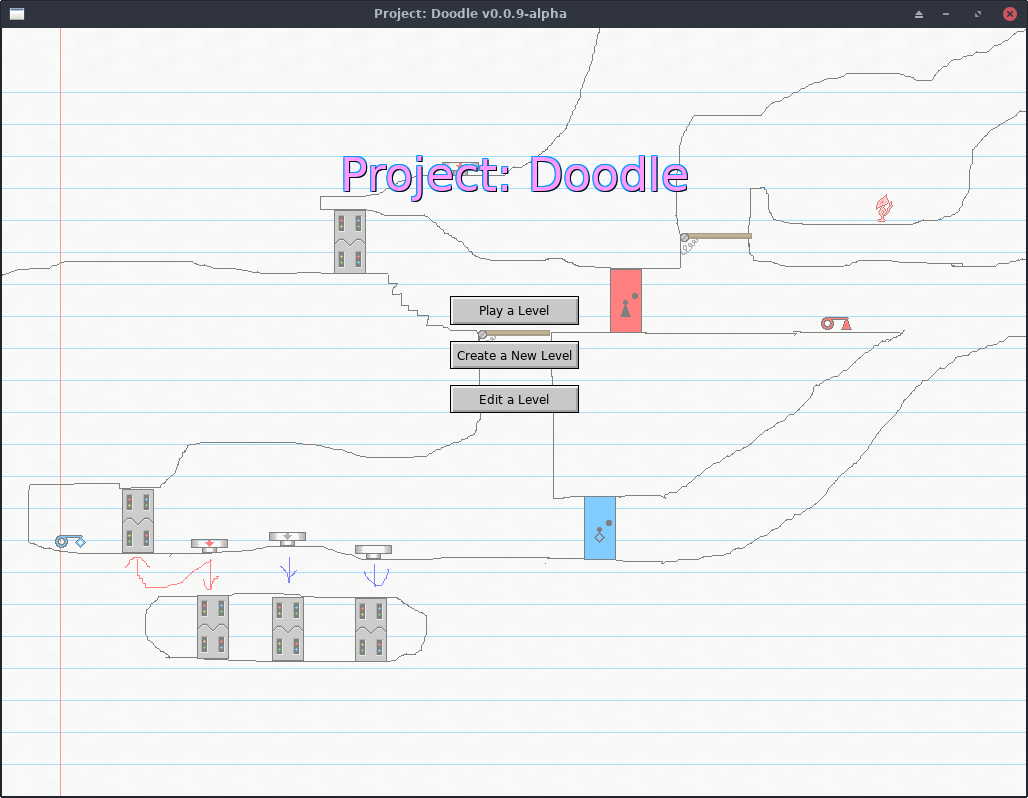
...for now. I have a better name picked out for it, but I'm going to be callling it Project: Doodle (while it's in alpha) so that the finished version will be distinct from the alpha versions, of which it may end up looking nothing like!
The theme of Doodle is centered around hand-drawn, side-scrolling platformer type mazes. You can draw your own levels using freehand and basic drawing tools, color in some fire or water, and drag in pre-made "Doodads" like buttons, keys and doors to add some interaction to your level.
Read more for a screenshot, more information and alpha version download links (Linux, Windows and Mac OS).
Something pretty odd that's happened to me on more than a couple of occasions:
I'll wake up in the morning, and then a couple minutes later people start sending me messages on Google Hangouts, so my phone's making a bunch of noise. If it's early enough in the morning, some of those messages will even say things like, "you're up early."
The thing is though, I didn't even touch my phone yet. I didn't even look at my phone.
Messages like this don't tend to wake me up, but instead I don't start getting messages until just after I'm awake.
Last weekend I was pleasantly surprised to discover that Time Warner Cable already supports IPv6 at my apartment.
They shipped me a newer cable modem/WiFi router combo device earlier this year as part of their plan to upgrade everyone's Internet speeds in Los Angeles. I didn't realize that this modem also supported IPv6, and it wasn't enabled by default.
First and foremost: this requires the victim to click not one, but two random links sent to them over Pidgin (or any other program that does URL auto-linking the way Pidgin does). So it's not exactly the most severe vulnerability, but I found it interesting nonetheless.
Today, Fedora 21 was released and I upgraded to it immediately, and decided not to install Skype this time.
Skype for Linux has been poorly maintained, going years between updates sometimes, and who knows what kind of unknown zero-day vulnerabilities are in there. On my previous installation of Fedora, Skype twice showed a weird issue where it replaced some of its icons with Chinese (or Korean, or something) symbols. I posted about it on Reddit and the Skype forum with no responses, as if I'm the only one who's ever seen this. Was I hacked? Maybe.
I took the latest Windows version of Skype and dumped all its icons trying to find these weird symbols but came up empty-handed. And I don't know of any way to pry icons out of the Linux binary of Skype. So... for now I just don't trust it.
In other news, I decided to Google the Skype protocol, and see what the progress is on people attempting to reverse engineer it, to be able to build an open source third-party Skype client (e.g. to have support in Pidgin). The Wikipedia article said something interesting:
On June 20, 2014, Microsoft announced the deprecation of the old Skype protocol. [...] The new Skype protocol - Microsoft Notification Protocol 24 - promises better offline messaging and better messages synchronization across Skype devices.
I wrote previously that the MSN Messenger service was still alive but it looks like it's the future of Skype as well.
The Microsoft Notification Protocol (MSNP) is the protocol used by MSN Messenger/Windows Live Messenger. I'm reasonably familiar with it from back in the day when I used to work on chatbots that signed in to MSN Messenger to accept their add requests and carry on conversations with humans.
MSNP is a plain text, line-delimited protocol similar to SMTP. There is some outdated documentation up through MSNP10 that we referenced in developing an MSN module in Perl. As an example, this is what you'd see going over the network if somebody sent a chat message to a friend:
MSG 4 N 133
MIME-Version: 1.0
Content-Type: text/plain; charset=UTF-8
X-MMS-IM-Format: FN=Arial; EF=I; CO=0; CS=0; PF=22

Hello! How are you?
The protocol consisted of command lines, typically three letters long (some I remember offhand: NLN--go online, FLN--go offline, BRB--set status to "be right back", RNG--request a conversation with a contact ("ring"), ANS--accept a conversation request ("answer"), and MSG--send a message). The RNG and ANS commands were invisible to the user in the official client, but allowed for some interesting behaviors in our chatbots (like immediately sending you a message the moment you open their chat window, before you even begin to type anything!)
It's interesting that Skype "downgraded" to the MSNP though, given that Skype's old protocol was an impenetrable fortress of obfuscation and encryption that nobody's ever managed to reverse engineer. Even third party clients like Trillian that had Skype support were technically using SkypeKit, a developer tool that allowed Skype to be remote controlled, but which kept all the proprietary bits a secret still. On the other hand, it makes sense for them to make Skype conform to Outlook.com and their other services that used MSNP, rather than upgrade all their other services to use the Skype protocol.
The last version of Windows Live Messenger used MSNP19 (or MSNP21 depending who you ask), so the new Skype protocol is just the next version of MSNP.
In Googling MSNP24 I found this site where efforts are already underway at reverse engineering it. This other site has a lot more details on the current status of the Messenger protocol.
It's only a matter of time now until Pidgin can natively support Skype accounts. It will also be fun to program chatbots for Skype. :)
These are just some of my thoughts on things that a Minecraft clone should probably do differently to Mojang's (well, Microsoft's) Minecraft, since a clone would be starting from scratch anyway and would be in a good position to fix some of the fundamental problems in the original game that are impossible/unlikely to be fixed by Microsoft.
Some of the Minecraft clones I'm familiar with so far are Terasology, Minetest, and Michael Fogleman's Craft. So far, Craft seems to do the most things "right" (as far as my list of fundamental improvements on Minecraft go) such as only storing changes to the blocks to disk rather than whole entire chunks, but more on that in a minute.
Disclaimer: I'm not a game developer. I am a software developer and have a particular interest in the technology used in games, i.e. I have the knowledge to write code for most given game mechanics and spend countless hours thinking about these sorts of things. I've read a lot about the technical internals of Minecraft and have read some of the source code to these clones, so this blog post is full of my own educated opinions on things. I may, at some point, take on the challenge of creating a Minecraft clone of my own, but until then these are just the things I've been thinking about over the last several months.
UPDATE (June 12 2022): I wrote this blog post originally in 2014 and it's highly likely that Grindr's data folder on Android doesn't look anything like this anymore. I haven't rooted my Android phones in a long time and haven't run Grindr in several years either. I sometimes get emails from people asking for help getting into their Grindr cache -- I can't help you, and don't ask me about this. This blog post is very outdated, Grindr has gone thru several complete re-designs in the last 8 years and they've probably changed everything about their data folder layout.A long time ago, the Grindr for Android app used to store its photo cache on your SD card, but lately they hid them away in the app's private space to make them slightly more difficult to get to. I decided to go exploring using Root Browser and see what I could find out.What you can do if you want to look into this yourself is: root your Android phone, look in your /data/data folder for Grindr's app data, copy it out to your PC and go thru it yourself. The
filecommand on a macOS or Linux terminal can tell what type of file something is regardless of its extension (in this post, many JPEG photos were named with ".1" file extensions instead of .jpeg and Linux easily ferreted this out).Also note that rooting your Android phone may require a factory reset of the phone, so if it's your existing Grindr cache you want to get into, you may be out of luck. Google Pixel phones for example officially support unlocking the bootloader (necessary for flashing custom ROMs and root), but this action forces a factory reset for privacy (e.g. a thief stole your phone and wants to root it, which would let them bypass your lock screen, Google wants the phone to mandatorily reset to factory defaults before it can be rooted). Some phones with shadier root exploits may not need the factory reset. You're on your own either way. Don't ask me for support in rooting your phone or helping you hack Grindr.
When I say "photo cache" I mean the place where Grindr downloads pictures locally so that it doesn't need to keep redownloading everyone's pictures all the time and consuming a lot of unnecessary bandwidth. Grindr caches both profile pictures and pictures received over chat messages. They both go into the same place. So if you have access to that place, you can get high resolution copies of all pictures received over chat and have them on your PC. :)
First of all, you'll need a rooted Android device for this, because the Android OS normally doesn't allow apps to get into each other's private data folders. The Root Browser app is a file browser that's root-aware (so it will prompt for root permission when you attempt to open a folder that ordinarily you can't open without root).
So, without further ado, Grindr's photo cache is located at /data/data/com.grindrapp.android/cache/picasso-cache/. This folder may contain a lot of files, mine had 3,458 and so Root Browser took a while to load that folder. You can copy it somewhere under /mnt/sdcard and then get to your files from a PC that way. Make sure the files are no longer owned by "root" when put in the SD card part, or you may run into issues when accessing them from your PC.
Most of the files in this folder have hexadecimal names that appear to be hashes of some sort, and the names usually come in pairs, one with a ".0" file extension and the other with a ".1", for example one I found on my phone was 4e21d675447678d0493bc8cb41a56e8d.0.
The ".0" file is a plain text file, and most of the ".1" files are the JPEG images. I use Linux, and my file browser automatically identified the types of all the files and showed thumbnail images for all the ".1" files. So, most of the time if you rename one of the ".1" files to have a ".jpg" extension you can see the images under Windows.
Some of the .1 files aren't images though. Some are more text files, and I peeked inside one to see what it was:
$ cat c1749deee81d4fece16d836e177c5852.1

[{"messageId":16970,"title":"Calling All DJs & Bartenders","body":"Are you one of the sexiest DJs or bartenders and able to work a paid event on the afternoon of April 27th in Palm Springs?  If so, send us your information and a link to your website to [email protected] or simply tap 'More' to email us directly. ","actionTitle":"More", "dismissTitle":null, "expirationDate":1396853940000, "url":"mailto:[email protected]"}]
These appear to be the broadcasted pop-up messages shown in the app sometimes.
Now, the other interesting files are the ones with the ".0" extensions. These appear to be debug information, and they're basically the full HTTP request dump used to download the ".1" file. Here's what the one looked like for my profile picture (in case the Grindr CDN link stops working and you're curious, it's this picture):
$ cat 4e21d675447678d0493bc8cb41a56e8d.0
http://cdns.grindr.com:80/images/profile/1024x1024/d8dfd4eb2abd9c4d29653587cc87912b393bac97
GET
0
HTTP/1.1 200 OK
14
Accept-Ranges: bytes
Content-Length: 72057
Content-Type: image/jpg
Date: Fri, 04 Apr 2014 20:09:05 GMT
Etag: "98af07f8697f854734874296a90c640f"
Last-Modified: Sat, 01 Mar 2014 22:05:22 GMT
Server: ECS (lax/2851)
x-amz-id-2: [REDACTED]
x-amz-request-id: [REDACTED]
X-Android-Received-Millis: 1396642144430
X-Android-Response-Source: CONDITIONAL_CACHE 200
X-Android-Selected-Transport: http/1.1
X-Android-Sent-Millis: 1396642144347
X-Cache: HIT
I edited-out the "x-amz" headers because I'm not sure how secret those are supposed to be.
When browsing through my cache folder I also saw some pictures that weren't profile pics, but were sent over chat messages. These always seem to be the full resolution of the original pic sent, i.e. not thumbnails or anything. The ".0" file looks the same as for a profile picture, except the URL downloaded begins with "http://cdns.grindr.com:80/grindr/chat/" and the server headers respond with a "Content-Type: binary/octet-stream" (which causes a web browser to download the picture to disk instead of displaying it in the browser).
Some of the ".1" files are actually empty (0 bytes), and their .0 files indicate that these are the ad banners (requesting a URL from googleads.g.doubleclick.net). So it looks like whatever system in Grindr is responsible for downloading pictures also sorta deals with downloading ad banners, except it doesn't actually save the banner into the cache folder.
The last somewhat not-very-interesting file in the cache folder is called "journal", and it's a text file. By reading the first couple lines, it appears to be part of libcore.io.DiskLruCache, a bit of Java code that provides a rotating offline cache. This probably means that, if Grindr's cache folder fills up, it will automatically remove old files to make room for new ones, so it can keep its overall disk usage under control automatically. The journal file appears to list the hash names of all the other files in the folder, along with words like "CLEAN", "DIRTY", and "REMOVE".
0.0022s.