Kirsle.net
I blog about anything I find interesting, and since I have a lot of varied interests, my blog entries are kind of all over the place. You can browse my tags to sort them by topic and see which ones I frequently write about, or the archive has a complete history of my posts, dating back to 2008!
Besides my blog, I have pages for my creative projects, which are linked to on the navigation bar.
I write a lot about Linux and Android, Minecraft, and I like to rant about stuff. Generally anything that makes me curious. Also check out my Bookmarks for all sorts of cool websites about various topics I'm interested in.
For the geeks: this website respects your privacy and doesn't run any third party ads or analytics. This site speaks HTTP and doesn't require any JavaScript to work.
Text-Based CyanChat ClientSo, I've decided to update the modules and add some better examples in its documentation. I also thought it would be nice to include a demonstration program for a CyanChat client. The distribution already comes with a sample server script, but none for a client. I didn't wanna include a bot though, because then CyanChat would have these bots entering the room from people testing the demo script, and nobody likes bots. And then, PCCC is a heavy program to include as an example script. So, I decided to make a new CyanChat client that would be light enough to work.
So, I've created a text-based CyanChat client:
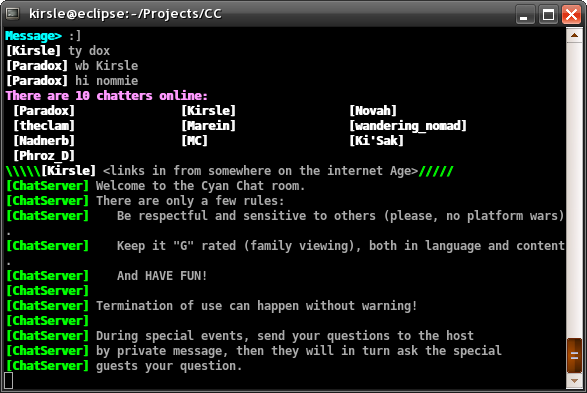
The script is mostly standalone: just one Perl script that uses Net::CyanChat. And also Term::ReadKey, which is easy to install. It doesn't use Curses or any other terminal GUI toolkit: it's all plain old text and ANSI colors. I built in my own kind of buffer system, and any time the chat dialog (or typed message prompt) changes, the window is cleared and redrawn from top to bottom, keeping track of how many characters and lines are being written so that it cuts off the buffer directly at the bottom of your terminal. And it works no matter what your terminal's dimensions are.
More screenshots:
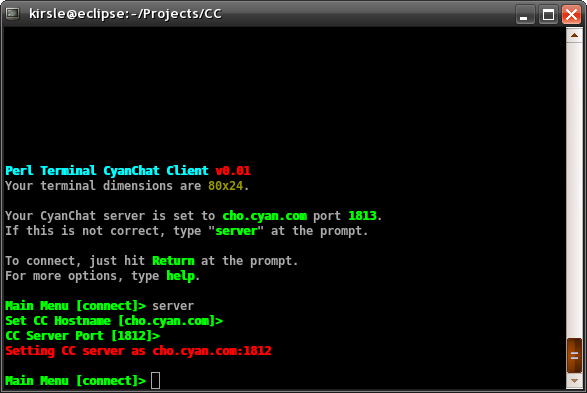
The main menu screen, changing the CC host back to using port 1812 (I used 1813 as the default port number for development purposes).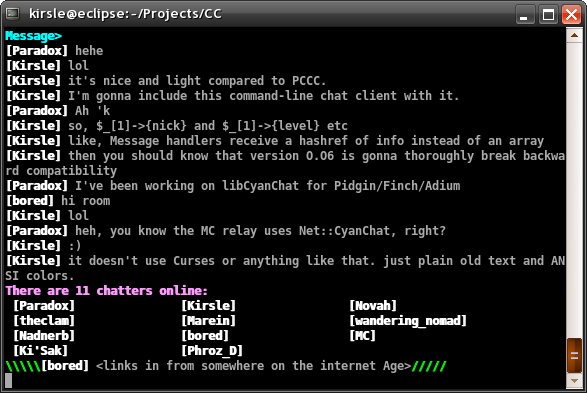
The CyanChat client in full operation.
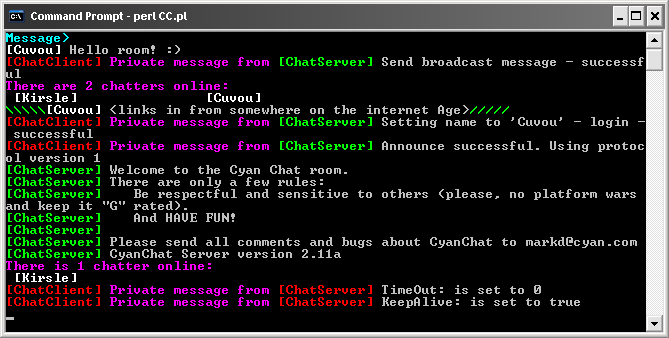
Update: It works on Windows too (to much amazement as the command prompt completely sucks):
Dynamic Drive's was cool and I've been using it thus far to generate all my favicon files (and some regular icons for use in some of my software like PCCC and ErrorGen), but my generator 1up's that by also being able to include 96x96 resolution icons (Windows Vista size).
To those curious, I mainly used the Perl modules GD and Imager to manipulate the uploaded image and save it as a Win32 icon. I won't give out the code behind my favicon.cgi though because it's really not that hard to figure out just from the manpages of the Imager module (see Imager::File::ICO).
Recently Atheros decided to make nice with Linux and contribute with driver support for Linux. That's cool, except Fedora 9 is all but almost expired and we still have nothing but a hacked Madwifi. In Fedora 10, a built-in kernel module should allegedly have the wireless card work out-of-the-box. But until Fedora 10 is released on the 28th, I'm in limbo.
On my Fedora 9 install I was reluctant to update the kernel knowing that it would break the wireless, especially while the Livna repository didn't have a matching upgrade to the Madwifi hack. But I updated it because there was a matching Madwifi this time, but that made my old (working) kernel 2 versions behind current. So, Fedora installed the new kernel and uninstalled the old one that worked. And, the wireless didn't work anymore with the new kernel.
So, I installed Mandriva Linux. Mandriva is used on the Acer Eee PCs and works heavily with Atheros hardware, and it was known that my particular wireless card works out-of-the-box with Mandriva. And it does. And Mandriva has a pretty default desktop theme. But, it's also a very annoying distro to use.
It's an RPM-based distro, but it doesn't use YUM for its front-end package manager. It uses something called URPMI, which doesn't have a very comparable interface at the command line. That's only an annoyance, but what I have a bigger issue with is how Mandriva replaces standard GNOME utilities with its own "control center" suite, which frankly sucks in comparison.
Mandriva's idea is that they wrapped all system administration tasks -- managing users, hardware, services, software -- into something similar to the Control Panel in Windows. Instead of using the already available, tested and stable GNOME programs, they reinvented the wheel. The most annoying part is that Mandriva's network manager applet really sucks. With GNOME's Network Manager, you can just click the icon on the panel and select the radio box for a wireless network that appears in the dropdown. The applet connects or it doesn't connect and it's really simple and straightforward. Mandriva's system has so much more complexity to it that of course it has bugs.
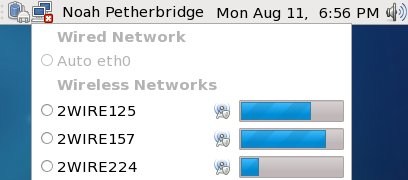
I can connect to my home network and the network at the office, but many other wireless networks, the applet just refuses to connect to. I click connect and it tells me it's making an effort to do so, but it doesn't, it just sits there forever and ever and doesn't go anywhere. The only way I found to connect is to go into some "Monitor Mode" (some advanced-looking packet monitoring thing that graphs out the network activity) and click some "Connect Wifi" button in there to get the wifi to even connect.
And, I couldn't get the GNOME Network Manager applet to install and work either. Mandriva's custom setup with the network means that the sysconfig scripts for the network devices are dynamically updated by Mandriva's own network program, so that, if I could get GNOME Network Manager to start, it wouldn't be able to find which devices to monitor because anytime I update the config scripts by hand, Mandriva overwrites them again.
Grrrr. I so can't wait for Fedora 10 to come out. >.<
sayto is a wall-like program I wrote at work which acts like wall but only broadcasts the message to a single user (instead of to every user), and takes care not to broadcast to any terminals that are running VIM, or any other process besides plain old bash (or other shells).
kbackupd is a backup daemon script I wrote for my web server. Others might find it useful so I've provided it for download.
Check them out on the Terminal Utilities page.
But, instead, I decided to make a completely new design, called "Cosmos". I'm quite pleased with it for now. The jump from designs that were getting gradually lighter and lighter back to something very dark might cause some complications on certain pages. I'll figure that part out later, though.
Here's a screenshot:
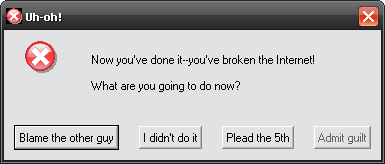
It's only a module so far that can be included in other Perl/Tk applications. But it's one very large step closer to me creating a simplified tool to spawn error boxes which could be provoked from batch files or scripts. It will probably have a syntax similar to the GNOME program, Zenity.
CPAN takes a few hours to index module updates but the new module will be available at Tk::StyleDialog on CPAN.org.
UPDATE: I've thrown together a quick program called ZenMsg (a name derived from GNOME's Zenity, but since my program only does dialog boxes, it's called ZenMsg).
I've added it as a new tab to the ErrorGen page. Let me know if it can be improved. I had to use ActiveState PerlApp to compile it because PAR::Packer (which I usually prefer to use) was giving me trouble and I didn't have the time or motivation to setup a clean new compiling environment for it. PerlApp may be a bit too limiting.
See the new tutorial pages.
Also, I've created a new tutorial on how to fight off the "dumb submitter" spam bots.
And finally, I made an icon for cuvou.com. It's the icon in the corner of the tutorial pages, and the favicon.ico has been updated to be that instead of the pink GNOME foot that it previously was.
It turned out I was calling a blur() method on a variable that wasn't actually there, so on Windows IE it defaulted to the browser window. The intention was to remove focus on the hyperlink so that the dotted border wouldn't remain when clicking the tab.
Also, a small tweak in the style sheet means that the tab borders don't intersect through the top of the selected page.
Edit: Actually, I have all the old designs online and just fixed them so they link back and forth to each other. Start at the very first design.
For some quick history, I had Comcast cable internet when I lived in Michigan, and now I have AT&T DSL (only because the local cable companies don't have lines in this apartment complex).
So, I noticed a problem when my VirtualBox virtual machines were having Internet issues. The virtual machines were Windows 2000 and Vista Home Premium, and neither of them could surf the web because they weren't able to resolve domain names.
VirtualBox creates a virtual NAT for the guest operating systems that allows them to use the host's Internet connection. The NAT has a 10.x.x.x IP range and automatically assigns an IP address to the virtual machine. This all was working just fine, but no Internet still. The results of "ipconfig" in the guests showed that my DNS suffix was "hsd1.mi.comcast.net" -- my old DNS server in Michigan.
I knew that my Linksys router was caching this information but didn't think it really mattered. Linksys was giving my Linux PC this DNS suffix as well, and Linux was passing it on to my virtual machines. The router had no interface on it to clear the cache.
At any rate, I narrowed it down that the virtual machines could not resolve domain names -- they could connect directly to Internet IP addresses, though. I tried a couple ways of "fixing" their DNS server information to no avail, and decided to reset the router to its factory defaults (to clear its cache). After a reset, I rebooted into Windows to configure it.
Linksys routers, by default, give out IPs in the 192.168.1.x range. My DSL modem also gives out IPs in this range. The only way to connect to the modem through the router is to change the router's IP range, so I've been setting it to 10.10.1.x. After setting up the router and putting in AT&T's DNS servers (which are required, or else the modem won't allow the router to reach the internet), I rebooted to Linux and started a virtual machine to see what changed.
Well, Windows 2000 still couldn't resolve domain names. I got an idea about installing a DNS server on my Linux box and telling the virtual machine to use it as its DNS -- this didn't work, because VirtualBox gives out 10.x.x.x IP addresses, which the host OS also got from Linksys. So, Windows 2000 wasn't able to route upward to the host's IP because of this. So, I instead set its DNS servers to be that of AT&T's -- the same as my router's settings. Now, the Internet worked within the virtual machine. It worked really well, too. DNS resolving time was almost nonexistant.
Realizing that Windows 2000's direct use of AT&T's DNS servers was the cause, and realizing that with the factory reset on Linksys that it had lost Comcast's DNS cache information, I tried browsing the web from my PC too. It was much faster now.
I had noticed a while back that my DSL was only slow while resolving domain names, but that once it actually connected to the server, the pages downloaded fast. I didn't make the connection between that slowness and Linksys's caching of Comcast's DNS server though. But now everything is so much faster. :)
0.0016s.