Kirsle.net
I blog about anything I find interesting, and since I have a lot of varied interests, my blog entries are kind of all over the place. You can browse my tags to sort them by topic and see which ones I frequently write about, or the archive has a complete history of my posts, dating back to 2008!
Besides my blog, I have pages for my creative projects, which are linked to on the navigation bar.
I write a lot about Linux and Android, Minecraft, and I like to rant about stuff. Generally anything that makes me curious. Also check out my Bookmarks for all sorts of cool websites about various topics I'm interested in.
For the geeks: this website respects your privacy and doesn't run any third party ads or analytics. This site speaks HTTP and doesn't require any JavaScript to work.
Android - MMS Without Data
Any further comments being like "hurr durr you get MMS to work without data by turning on data" will be redirected to /dev/null. And anyway, this blog post was written when Android 2.3 was current and the steps probably don't even line up 1:1 any more.
This post was written in the Android 2 days, and I don't know how you do this on modern Android today. Hopefully the above gives you some useful information, and let me know in the comments what the instructions would be today. On to the original post:
My Nexus One was originally for T-Mobile's network, so it doesn't work with the 3G on AT&T's... but that's fine because my AT&T plan doesn't include data. But, my phone can still use AT&T's Edge network.
I don't want any random background apps using the Edge network and costing me usage fees when I'm out and about. But, if I disable Mobile Data altogether, picture messaging (MMS) stops working too. So after a lot of searching around I seem to have found a way to disable the mobile network for all apps, but still allow MMS to be sent/received using it.
On my Nexus One, from the home screen:
YMMV.
How to get a Gnome-like panel layout on Windows XP (and Windows 2000 and some older versions as well). Here's what the end result will look like:
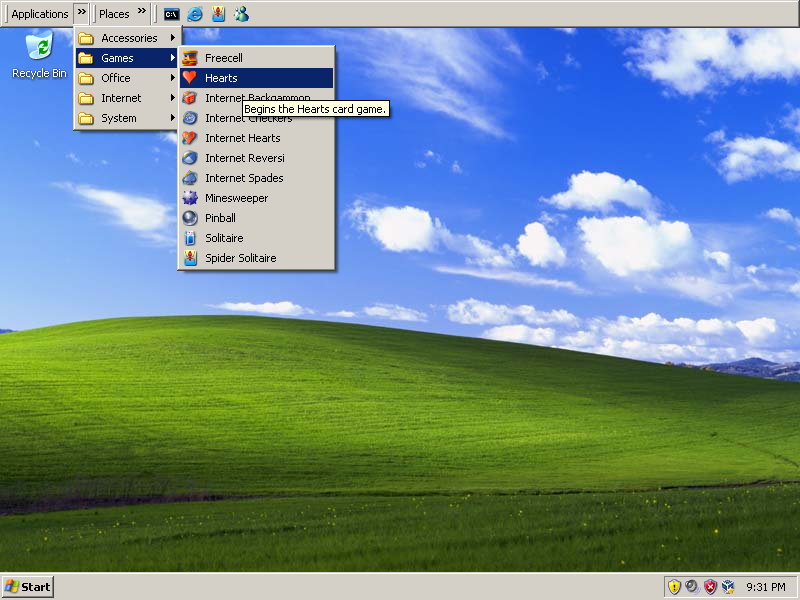
Click for a bigger screenshot (800x600).
The how-to:
Right click the panel and choose "Always on top" and your panel will always be visible even when you have a maximized window open.
This doesn't work on Windows Vista or Windows 7, because toolbars aren't allowed to be separated from the task bar anymore in these systems. :(
That being said, here's how to get Fonality HUD to run on Linux using Wine (a compatibility layer that runs Windows executables on non-Windows platforms).
There are two methods: using your system version of Wine, or use PlayOnLinux which can manage multiple versions of Wine for you.
# For Fedora/RedHat users
$ sudo yum install wine

# For Ubuntu users
$ sudo apt-get install wine
2) Install Java Runtime Environment in Wine
I recommend creating a new wine prefix specifically for HUD, just to keep it separate from any other Wine apps you may use. HUD will require the Java Runtime Environment to be installed. The installer for HUD will normally try to install this automatically, but in my experience the installer might not work, so it's best to get Java manually.
Get the Windows JRE installer from here (or else Google it). I've had better luck using the Offline installer so I recommend using that.
Install Java in your wine prefix:
# Using a wine prefix:
$ mkdir ~/.HUD3
$ env WINEPREFIX="$HOME/.HUD3" wine jre-6u25-windows-i586.exe

# Not using a wine prefix:
$ wine jre-6u25-windows-i586.exe
3) Install HUD
Now use Wine to run the HUD installer.
# Using a wine prefix:
$ env WINEPREFIX="$HOME/.HUD3" wine hud-*.exe

# Not using a wine prefix:
$ wine hud-*.exe
The launchers for HUD in the menu may or may not work, if you have trouble with them I recommend just creating your own launcher. These details should work fine:
env WINEPREFIX="/home/kirsle/.HUD3" wine 'C:\Program Files\Fonality\HUD3.5\HUD.exe'
~/.local/share/icons folder, so browse around for it.Now hopefully everything should "just work."
If not, you may need to use PlayOnLinux instead, because sometimes particular Wine versions don't get along very well with HUD.
1) Get PlayOnLinux
Visit PlayOnLinux.com and install it.
2) Begin installing HUD
1. In the PlayOnLinux window, click "Install"
2. Click "Install a .pol package or an unsupported application" at the bottom of the Install window
3. Choose "Manual Installation"
4. "Install a program in a new wine prefix"
5. Name it "HUD3"
6. Check "Assign a Wine version to the program"
7. Select a Wine version to use. You can manage and download Wine versions from PlayOnLinux by going to "Tools -> Manage Wine Versions" from the main window.
8. It will create the wine prefix.
3) Install Java
For now, ignore the PlayOnLinux window. Get the Java JRE installer, and install it under the wine prefix created by PlayOnLinux:
$ env WINEPREFIX="$HOME/.PlayOnLinux/wineprefix/HUD3" wine jre-6u25-windows-i586.exe4) Continue installing HUD in PlayOnLinux
Go back to the PlayOnLinux window and continue following the prompts. Browse to the HUD installer when it asks. If it asks you to "Choose a file to exec the game", browse to the HUD3.exe from the installed application.
Some common bugs I've found and how to work around them:
Apparently, Mac OS X Lion supports Emoji icons like iOS does.
Please, nobody get in the habit of using these. Anywhere. Unless you're talking specifically to other Apple users.
Nobody else supports Apple's particular variant of Emoji icons as well as Apple does. For Linux and Windows users, all your Emoji icons you paste in Twitter updates don't work. Most of the icons will be completely broken for these users (rendering as a block character), and the few icons that do render, won't look nearly as good as on Apple devices: they'll just look like Unicode characters, i.e. using the same black-and-white font color as everything else. Not full color icons.
It's already bad enough that cross-platform mobile apps (iOS and Android) have idiots using Emoji icons everywhere (which do not display on Android at all, but show as broken block characters), but for desktop Apple users to be able to paste Emoji icons everywhere else is just the most terrible news as of late.
Don't use them. Period.
The album is here: http://imgur.com/a/WAKF2
To add to the reasons why GNOME 3 impacts other areas of the Linux ecosystem in ways I wish it wouldn't, they have changed the behavior of zenity and removed a feature just because it no longer makes sense for GNOME 3.
Zenity, btw, is a command line program for displaying simple dialog boxes and things that may be useful for bash scripts. It can pop up alerts, progress bar windows, open/save dialogs, etc.
One feature it used to have was --notification, which let you put an icon in the Notification Area ("system tray") on your desktop. But now, since GNOME 3 doesn't have the same concept of the Notification Area as other desktop environments, Zenity's --notification option no longer puts an icon in the Notification Area.
Now it uses GNOME 3's style of notification... which is, the same behavior as notify-send - it pops up a Growl-like black bubble in the corner of your screen with a temporary message (like "New updates are available").
This sucks.
I was playing with writing a desktop Google Voice app for Linux, which would have an icon in the Notification Area and notify about new texts and things. I was going to just use Tk for the GUI (even though it's ugly as sin on Linux) and use Zenity only for the notification icon. But I can't do that now! Now I might as well make my GUI in GTK+ so I can use the Gtk2 module for the notification icon.
GNOME developers, the universe does not revolve around GNOME. If Zenity's --notification is just going to duplicate the functionality of notify-send, you might as well just have switched to notify-send and leave Zenity how it was before.
I'd written a Perl script a while back that would act as a super simple front-end to Mednafen, an NES and GameBoy emulator. It just used Zenity to open a file select dialog to let you browse for a ROM to load.
But now, Zenity's file selection dialog doesn't have any way of letting you specify which directory it should look in by default. It used to start in whatever the script's current working directory was, but now it ignores all that and always starts in the "Recently Opened Files" list.
Do we need to fork Zenity now? This is so ridiculous.
I love it when the law blows up in the face of the Soccer Mom Brigade.
"Soccer Mom Brigade?" It's a term I made up to describe the sort of person who complains about this sort of thing. Dumb people (usually overbearing parents who don't know anything but think they need to have an opinion about their kids' lives, hence, "soccer mom") find something--no, they seek out something to bitch about, and they write angry letters to whoever they need to in an attempt to get the thing banned for everybody.
If the target of the complaints doesn't ban it straight away, the soccer mom goes on a crusade, gathering up all the other soccer moms in the neighborhood and forms the Soccer Mom Brigade, where they become very loud, very obnoxious, and make their point heard across the country, usually getting the media involved. And then stupid stuff gets banned for stupid reasons.
Example I can think of offhand: the Pokémon episode "Tower of Terror" (where they visit the Ghost Pokémon Tower in Lavender Town), because the Soccer Mom Brigade thought their little 5-year-old would relate the title of the episode to the September 11 attacks. And they succeeded. Bullshit.
First of all, I don't believe the AI in Pokemon has any reason to cheat. Pokemon battles are by default completely fair. Every Pokemon owned by the enemy trainer is a Pokemon you could also go out and capture or trade to get. And all the moves their Pokemon knows are moves you could teach to your own Pokemon.
But regardless the AI feels the need to cheat. Some examples I've seen:
How it cheats: it knows exactly which move your Pokemon is going to wake up on, and it will use Sleep Powder or Sing on this turn to put your Pokemon back to sleep (these moves would fail if your Pokemon is already asleep).
Evidence: the AI fails sometimes. If the enemy Pokemon is too fast, it will use Sleep Powder, it will fail because your Pokemon is already asleep, and then your Pokemon will wake up. This happens all the god damn time. You can also confuse the AI by using an item on the turn your Pokemon is about to wake up on (but, this is all down to chance, since you don't know which turn it will wake up on).
But I foiled its plans by healing my Gyarados. It followed up with a Quick Attack which did exactly 14 damage.
Protect always goes first in the turn it's used, and it prevents the opponent's move from hitting.
Bruno's Forretress is a cheating bastard though, because it only uses Protect when you're going to use your most powerful move. Forretress is weak to fire, so I used my Typhlosion's Blast Burn move, which is a very powerful fire attack. Forretress used Protect so it failed; I tried again, it used Protect a second time. Tried again, and this time it hit, because Forretress knows that Protect can't be used more than twice.
I battled Bruno later with my Umbreon. I used Dark Pulse, the most powerful move my Umbreon knows, and Forretress used Protect to block it.
I figured Forretress was gonna use Protect again, so I used Faint Attack instead. This hit. So I tried Dark Pulse again -- Forretress used Protect and blocked it. I tried again, Forretress tried Protect again, but it failed (you can't use it more than twice). So, I confused the AI there.
Anyway, I just think this whole thing is ridiculous. The AI has no reason to cheat. It wouldn't be that hard for Nintendo to program the AI to pretend it doesn't know all this stuff that it shouldn't know about the battle (hint: they just don't need to program it to look). There's probably logic in the code like, "if the player chose the player's most powerful move, and protect hasn't been used twice in a row now, use protect". Nintendo should just NOT write that code. Pokemon battles are fair by default.
So I've decided to post about a fleeting thought I once had, about where the Siikir CMS may end up one day (specifically, for Kirsle.net). Just to clarify, both siikir.com and kirsle.net run my Siikir code; they only differ in the pages and web design. The back end is kept in sync between the two.
I increasingly dislike Facebook, but I'm sorta stuck with it because it's the only way to keep in touch with certain people. There are a few open source, distributed social networking projects, such as Diaspora and GNU Social. The idea of these distributed networks is that anybody can set up their own Diaspora or GNU Social server, create their account on their own server (or let their friends or family create accounts), and they can still connect with millions of others who have accounts on various different servers.
They do this by utilizing open standards like OAuth and OpenID to share content between the servers. In theory, every Diaspora server should be able to communicate with every GNU Social server, even though the software is different, because they use the same protocols for sharing data.
I'm not interested in creating a social networking platform for the sake of creating a social networking platform. I'm more interested in finding something to replace Facebook for me. This is the primary goal of creating my Siikir CMS. I built it because I wanted to run Kirsle.net on it, and so Siikir supports web blogs, photo albums, messaging and commenting.
This way I can keep my blog and photo albums and things on Kirsle.net instead of on Facebook. But, I'm slowly adding Facebook integration into the Siikir CMS, so that eventually, I'll be able to post new photos on Kirsle.net and have my Facebook news feed automatically notify my friends to come and check them out. This is the short term goal; the long term goal is to implement OAuth and other standards so that Siikir can link with Diaspora and GNU Social servers.
In other words, Siikir may eventually grow up to be a distributed social network platform like Diaspora... even though that isn't really its goal.
(siikir.com will probably remain as an isolated island to itself, because it doesn't really fit the model of "general purpose social network." But if the Siikir code gets to this point, it will be released as an open source social networking platform)
I don't know how I missed this, but apparently VirtualBox finally supports a "Scale Mode."
I've always wanted this feature. Why, you ask?
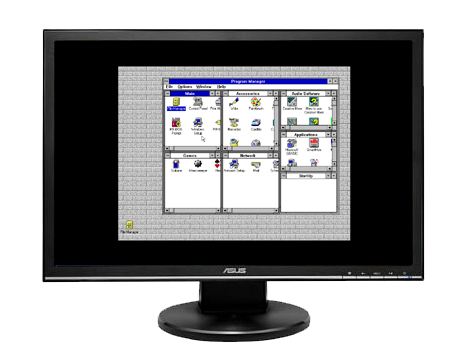
One easy example is for running an old operating system (older than Windows 2000) that isn't supported by VirtualBox, so that there are no Guest Additions for it. Guest Additions for supported OS's install extra drivers for the virtual machine, so that when you put VirtualBox into "Full Screen" mode, the guest OS will automatically increase its screen resolution to fit your display. When it can't do that, it will just display the screen at its literal resolution and put a black margin to fill in the extra space.
Here is an expertly Photoshopped demonstration of what I'm talking about. If you were running a Windows 3.1 virtual machine at an 800x600 screen resolution, and you put the VM full-screen, this is what it would look like on your 1366x768 monitor:
Another example: even on supported guests, running an older game like Starcraft (which runs in a resolution of 640x480) had this problem too: if the VM is running Full Screen and you start Starcraft... instead of the game's display stretching across your whole monitor, it stays at 640x480 pixels and is centered on the screen. This sucks.
So it seems VirtualBox has finally added Scale Mode (available in the "Machine" menu along side Full Screen and Seamless modes). There's one quirk to it, though: Scale Mode and Full Screen don't work together. On my system, going into Scale Mode put the virtual machine into a window on my screen. This window could be maximized, but it couldn't be made full screen. So that sorta sucks.
Luckily, my Linux window manager (xfwm4, the window manager of the XFCE desktop environment) supports putting any window full screen, whether the window wants it or not. This means the window decorations are taken away and the contents of the window are resized to fill the display. Success! I can now run full screen, scaled resolution guest operating systems. :)
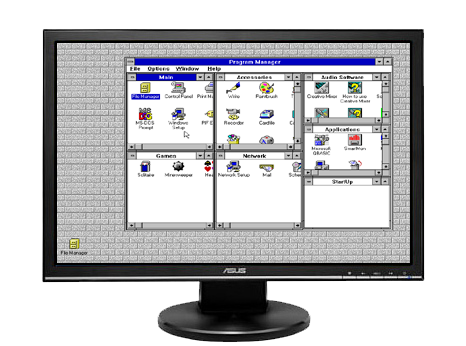
Scale mode with xfwm4's full-screen option gives you a "native" experience.
Luckily, this wasn't one of those typical, "I've installed eleven different PC cleaning programs and they all installed all kinds of malware and my computer takes two hours to boot and etc etc".
Instead, her only real concern was that when she logs on to the desktop, she gets this window popping up telling her the computer is infected with X amount of viruses, then it will pretend to scan your computer, and finally tell you to buy the full version to take care of the infections.
Yeah, one of those viruses.
I noticed that the desktop was solid black except for the task bar, and no icons were on the desktop. All that was visible on-screen was this one window. And, this window refused to close: it simply ignored the X button being clicked. I right-clicked on the task bar and noticed that "Task Manager" was greyed out.
Great, it's one of those viruses that disables Task Manager. Starting taskmgr from the Run dialog confirmed:
Task Manager has been disabled by your administrator.I've seen the likes of these before. Usually, if a virus does this (and a lot of viruses do), they'll also disable your Registry Editor, so that you can't just go in and re-enable the Task Manager. I was expecting I'd need to write a program to fix the registry for me because Regedit would be disabled, and if so, this is where I would've called it a day.
Fortunately, the virus didn't stop me from getting into the Registry Editor. So, I went in and re-enabled Task Manager. I just had to make sure I deleted the following key from both HKEY_CURRENT_USER and HKEY_LOCAL_MACHINE (in this case, only the LOCAL_USER was affected by this and all the other registry changes).
\Software\Microsoft\Windows\CurrentVersion\Policies\System\DisableTaskMgr (1)In Task Manager, I first killed off that GUI, and a couple other suspicious looking names.
Back in the Registry, I went to the Run and RunOnce keys in both places to find the name of the virus (viruses always place their keys in these places in the registry). It turns out this virus's main EXE file was under C:\Documents and Settings\All Users. So, I went there in Windows Explorer.
This folder was completely empty. OK, the files were all hidden, so I went into the Folder Options to enable the "Show hidden files/folders" option. There they are! I saw the hidden EXE's that this virus was running off of. After a few seconds, all the icons disappeared again. Clever virus! It changed my "Show hidden files/folders" option back off again.
I turned it back on, and deleted these files. Then, I rebooted the computer (since I removed all the startup keys--and made sure I looked in the "Startup" folder of the start menu)--the viruses weren't likely to start back up after a reboot. I was right. Virus has been neutered. Now I had to clean up the damage.
First, I had to fix the desktop. The virus had disabled right-clicking on the desktop, disabled desktop icons, and disabled the ability to set the desktop wallpaper. I had to fix this by deleting these keys from the registry (again, only under CURRENT_USER, but check for LOCAL_MACHINE too if this ever happens to you):
\Software\Microsoft\Windows\CurrentVersion\Policies\Explorer\NoViewContextMenu (1)
\Software\Microsoft\Windows\CurrentVersion\Policies\Explorer\NoDesktop (1)
\Software\Microsoft\Windows\CurrentVersion\Policies\ActiveDesktop\NoChangingWallpaper (1)
This let me restore the desktop to its original glory. Then, I noticed the Start Menu was just absolutely empty. There were no "recently used" apps in the menu, and when I moused over the "All Programs" link, I just got a small pop-up menu that said "(empty)"
So I right-clicked the Start button to "Explore", and noticed that all the start menu folders were marked as hidden. This was done in the local user account and the "All Users" folder. So, I un-hid all these folders to bring back the start menu items. But, this virus did something even more evil than that: it deleted every shortcut file from the Start Menu.
So, we got all the folders back in the Start Menu, but every folder was empty. Like, "Start->All Programs->AOL Instant Messenger->(empty)".
This virus really went to great lengths to make my great aunt's life more difficult. I neutered it and undid most of the damage, but there's no automatic way to restore the Start Menu shortcuts. Plus, I noticed that many of the programs mentioned in the Start Menu aren't even installed anymore at all. Maybe the virus actually deleted as many programs from the computer as it could? The only programs in "C:\Program Files" were core built-in programs that come with Windows (speaking of which, every folder in C:\Program Files was marked Hidden as well!)
If this was my computer, I'd reinstall the OS. But it's not, and I'm not getting paid for any further tech support, but figuring out what extent this virus messed up the system was fun enough in itself.
0.0019s.