Kirsle.net
The operating systems here are distributed as floppy disk image files (with an .img extension). If you actually have a floppy drive, you'll have to flash these images onto floppy disks. If you just want to use VirtualBox, it can make use of the floppy image files directly.
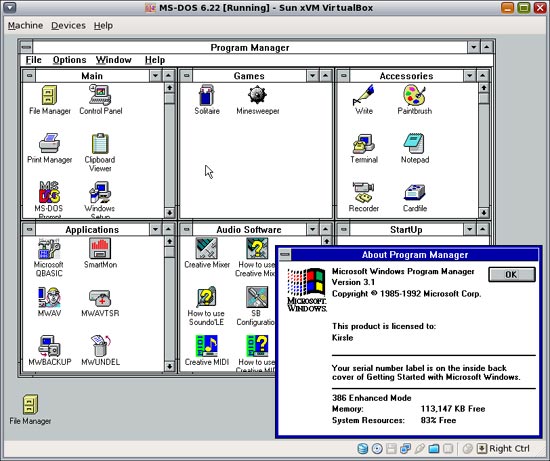
¤ Download (.zip, 3.5 MB)
Disk images (*.img files) for use with VirtualBox or flashing to floppy disks:
¤ Download (.zip, 10.3 MB)
Unpacked disk images (ZIP file containing all files from all disks in one folder, maybe useful for DOSBox installations):
¤ Download (.zip, 11 MB)
There are 209 comments on this page. Add yours.

dalbaev!!!!!!!!!!!!!!!!!!!!!!!111
Thank you very much I have this in floppy but don't have floppy drive any more this is great help
Kirsle this a great download brother, I been looking for this a long time and I finally found it on your page, I try it on virtual box and it work perfect, it remind me the good old days.
dose it inc all of the floppys?
is there a zip file instead of a tar.gz?

Download WinRAR, it can open tar.gz (I thought the latest WinZip would too though but not sure about that).
is for windows or linux?
I have a oracle virtualbox.It same than MSDOS
To open any basic zipped or compressed file (even some executables), download 7ZIP - http://www.7-zip.org/
Tx alot for the images
Why would anyone want to go back to the so called good old days. Windows is much better now than it ever has been.
Thanks a lot kirsle. You did a great job! Just the best download I ever found in the net. Greetings. Pete Hera
Thnks a lot!! :)
THANK YOU especially for the VirtualBox disk image. You rock
tank u i from iram !
thanks man, found my ancestors
Posted on Saturday, Sep 03 2011 @ 12:37 AM by Anonymous Why would anyone want to go back to the so called good old days. Windows is much better now than it ever has been.
I can offer my 2 reasons - Need (I have an old 3.1 Image Editor that I love (ProImage Plus) which has worked throughout the years until 64bit, now its dead - I hope this will let me keep on using it :) and 2 - A Trip Down Memory Lane.
Thanks for the Post.
Thanks for downloading, Kirsle. My first setup floppy is unreadable and I need a dos vm for a legacy app... thanks again.
Thanks. This brought back a lot of good memories. I installed it on a 32bit netbook just for kicks. You should hear some of the comments I get when I go into the local coffee shop to use the wifi internet with it. (c:}
Thank you so much!!! I have my old floppies in a frame on the wall (no way to install them). Now I am able to play Warcraft Orcs vs Humans on my Mac...
I am having a personal "nerd Fest" right now.
Thanks for the files. You saved the day!
/applause /whistle /cheers /bow
Thank you for the toys to live again the memories...
Hi thanks a lot for software offered they help me remake my old travel Texas available regards
Very kind of you, but the disk images are damaged. Just mount image 6 and run "dir". I tried to install with them and windows won't launch; a bunch of its executables are zero-length
Awesome!!! I don't need to take out the dust of my old floppy drive!!!
Thanks! This works well when you need to bypass the windows 98 upgrades disc setup programs request to verify your right to use it. And by the way, cool website. did you buy this from a hosting site or did you set up your own server rack at home?
Okay, so the install of Windows 3.1 and MS-DOS 6.22 in a VM on QEMU went without any problems, except for one peculiar problem: WQGHLT does what it needs to do (frees CPU cycles), but DOSIDLE does not. Also, when putting it in my AUTOEXEC, the whole system either freezes on startup (more common), or it gives a 'divide error' (or similar), keeping one of my cores at 100%. The effect is particularly noticeable when going into Windows 3.1, equipped with WQGHLT, from the command prompt, and seeing the usage in Task Manager on the host system go down significantly.
Am I doing something wrong here?
I haven't tested running this in QEMU, only VirtualBox. If you just run DOSIDLE.EXE by itself does it help? If so, the autoexec might just be wrong.
IIRC, you just have a line in autoexec.bat like this:
C:\DOSIDLE\DOSIDLE.EXE
@Kirsle All right, I changed the hard drive format from VHD to VMDK and the problem no longer exists.
Odd.
Having a problem trying to put this on an old Dell Latitude. Doesn't matter if I'm trying to install Windows 3.1 or MS-DOS, if I try to boot from one of the floppies I get this message: Remove disks and other media. \ Press any key to restart.
I'm fairly certain there isn't a problem with the floppy drive because I'm able to boot an MS-DOS startup disk I created with the Windows Explorer format tool (in Windows 7). I've tried booting this startup disk, then switched to an MS-DOS floppy, then ran SETUP from there but it then get a message: To install MS-DOS, insert Setup Disk 1 in drive A and press CTRL+ALT+DEL. This will restart your computer and begin the setup program.
Is there something I need to do to make these floppies bootable or something before I copy the image over to them?
very decent support for a dino os! i realy like your stuff, and i combine it with : http://cwshep.blogspot.de/2009/04/printing-from-dos-in-virtualbox.html to get printing in dos-in-vnox-on-linux-via-comport :-)
Thy, you are the man
Very good archive, Thanks a lot!
Great!
(um) how to download it
(#) i wanted to use MS-DOS
@Kirsle The MS-DOS floppies don't work really well in VirtualBox 4.2.*. I've tried to insert the 2nd floppy when it requests for it, but it always freezes (even CTRL+ALT+DEL doesn't work) so I have to reset the VM. MS VPC 2007/Win VPC works a little bit better.
That's weird. I just tested it in VirtualBox 4.2.0 and it managed to install DOS successfully (this is on a Fedora Linux host though).
@Kirsle It probably didn't work for me because I'm running a Micro$oft Window$ host, does that make any difference? Thanks! vmlover
@Kirsle I installed it successfully on my Windows OS with VirtualBox 4.1.8 like, say, 2 months ago. FYI, I've used the command "vboxmanage" to convert the VDI image provided in your tarball to a VHD image. I tested it on Microsoft Virtual PC 2007, but your Windows 3.1 (in 386 Enh. Mode) would not boot for a full 1.5 minutes after I typed "WIN" in the DOS prompt. It also gives you those funny errors like this:
PROGMAN.EXE caused a General Protection Fault in XXXX:YYYY.
Then, it makes you go back to MS-DOS. --vmlover
used dos op system develment databas application.and next learn c , assemble ' language R&D other product . I am 60 years old .
Please Help...
I really need Windows 3.1 for the sole purpose of using Paint. Without getting technical (coz I'd only confuse myself!!!) Paint on this version of windows was different from what it is today and that's the one I need!!).
I've read comments etc on here, but I really haven't got a clue about computers.
Please could someone be kind enough to explain to me how I could install this version of Windows on my PC, or maybe I could install it on another old PC I could get my hands to avoid losing data on my lovely new PC.
I would very much appreciate it so m if someone could please tell me step by step how I can install this using the links on this web page?
Many many thanks in advance
Jayne
Thanks a lot.
Please Help...
I really need Windows 3.1 for the sole purpose of using Paint. Without getting technical (coz I'd only confuse myself!!!) Paint on this version of windows was different from what it is today and that's the one I need!!).
I've read comments etc on here, but I really haven't got a clue about computers.
Please could someone be kind enough to explain to me how I could install this version of Windows on my PC, or maybe I could install it on another old PC I could get my hands to avoid losing data on my lovely new PC.
I would very much appreciate it so m if someone could please tell me step by step how I can install this using the links on this web page?
Many many thanks in advance
Jayne
You sir, made my day :)
thanks man it help me a lot
hey, im working on installing my old windows programs on virtual pc and my dos6 DISK 1 has errors. i got from spin rite that Setup.exe, Restore.ex_, and Qbasic.exe are corrupt...
Can i get these three and resave them on my disk or there an easier way here?
is a brilyant
Whoa! THese are great! Thanks so much. I have never been allowed to properly install windows from scratch (well, I did do a reinstall of XP but that's different) but now I can expirence what it was like to install from DOS from scratch, thanks thanks so so sos sooooooo MUCH!
well shit how thee fuck are you gonna get the right file from the 80 mb you dumb stupid bitch
Maybe you are just to stupid to understand.
Hey, do you know if I would be able to run this version of windows off of a USB on a modern (2009) laptop that I took the C: drive out of?
Thanks! Great to have these images - I have the floppies, but no floppy drive. Funny they're still called floppies when real floppies disappeared long before these came out. Floppies were the real deal when tape drives cost thousands. Sic transit omnia.
Thanks bro :-)
Thanks for these 3.1 disks. I was recently given my friends, now ancient, OS/2 for Windows 3.1 floppies. ACTUAL floppies, and needed a 3.1 base install for my VM. Time to go total nostalgia. ;D
Thanks a lot for these files!!
I get these weird 'Library file damaged' errors when I try to use certain aspects of windows or open certain programs. Any ideas what is causing this??
Thanks alot.
Thanks for the files cutie.
(||) sucks, and this is the opposite. it does not suck at all. dos ftw
Thanks bro! A trip back to the past!
i had Need For Speed 3 (retro) it was awesome helpful to me. now i can play that brilliant game. thanks so much.
I know this is a late comment but thanks for the Win3.1, I have a problem trying to get 256 colors I have a NVIDIA GeForce 7500 LE chip set board and wondering if I can use the old window3.1 display drivers?
If you're installing Win3.1 in a virtual machine, it doesn't matter what your real life video card is, the virtual machine sees the fake video card that VirtualBox shows it (i.e. Win3.1 would have no way of knowing you have an NVIDIA card even if it wanted to check. It just sees a standard VGA compatible card that VirtualBox presents to it).
So yeah. Normal VGA drivers will work. :)
Thanks for that Kirsle, I have 386grabber file called SVGA256.3GR and a driver SVGA256.DRV on my harddisk. For 256 colors do I just edit the system.ini / system.inf files to get the video drv installed?
Thanks Kirsle .. Your the man! :)
Dear All,
I have P1 system and have installed windows 3.11 work group with DOS 6.22 after some time (few hours) of running system indicate that "operating system not found" and system stop.
Can any one tell what would be the problem of having this message and what can we do to resolve the same.
Thanx for this I hace images of all tthe previous versions but the DoS files were on a CD thatgot brokken my history is now compete
m
Thank Thanks and Thanks again. The only problem I have is it keep telling to insert the disk labeled MS-DOS 5.0 disk 1 and I thought I had but it still says it. Any answers to that.
Jesus Christ! Thank you to Jesus Christ!!
FLOPPY FLOPPY FLOP
Thank you for this great download. I am looking many years for something like that. Many thanls
Hail Kirsle!!!
You are a true computer warrior!!!
My immensely powerful 4MiB RAM (1992?) Sanyo has a new lease of life.
do these drivers work on vmware
Check out my ideea here... http://betatestspot.blogspot.ro/2014/03/msdos-622-win-311-bootable-hard-drive.html
"Why would anyone want to go back to the so called good old days. Windows is much better now than it ever has been. "?!?!?! Sir, I believe you are in the wrong place... That's like asking why anyone would ever want to own a NES anymore because the newer systems are so much 'better'... There are plenty of reasons for installing a legacy OS such as DOS (CMD is NOT DOS) and Win 3.11.
@Kirsle Thank you very much for keeping this corner of the [Internet] universe going.
thanks for the files but i noticed with the WfW 3.11 disk images there are items missing from the control panel
Kewl!!! Thanks!
OMG! Thank you so much. :)
Kirsle Hey, I did not know you could tell me a program to format floppys. Dos to me that does not fit on a floppy disk.
Thank you. I want to try upgrading from Windows 1.0 to Windows 8 in VMware Workstation.
Downloaded Win3.11 on Dos6.22 - worked well. Now on a nostalgia high...
I downloaded this because I need the old Cardfile program to get at some old personal addresses and contact details from my original Win 3.11 PC days. I have these on a CD somewhere, in a .crd file. I loved DOS, and still use it on occasion; I've an ancient DOS laptop which still works; now I might be able to put the appropriate Windows back on it...
Now, does anyone have the old WordPerfect for DOS program?....
You did a great job on this VM. If anybody's looking for software to load up on this for the full effect we have a large library of this over at WinWorld
thanks for the upload mate!! :)
If you would like to view various other old DOS operating systems, I found these pages. http://winworldpc.com/ http://old-dos.ru/index.php?page=files&mode=files&do=list&cat=41 http://translate.google.com/translate?hl=en&prev=/search%3Fq%3Ddos%2B2.11%2Bcorona%26rls%3Dcom.microsoft:en-US:IE-Address%26biw%3D1024%26bih%3D420&sl=zh-CN&u=http://hi.baidu.com/skyonlyer/item/2bb9eddd51663915e1f46f40&sandbox=0&usg=ALkJrhi4RnQFysoA5Wuv-f1tIu05FbDegQ http://hampa.ch/pub/software/DOS/DOS/ http://vetusware.com/category/OS/?cat=1
Looks like a great site. Too bad I don't have an O/S on my old HDisks.
So what's the easiest method to transfer files two and from the VM, do you have to make a floppy image of anything you want to copy than mount it?
thx
Hi, hy host is Ubuntu, and I'm running dos and win 3.1 from the vdi file just fine, but I cant seem to make the shared folder thing to work. I setup the shared folder in virtualbox settings, but when I try net use x: \vboxsrv\sharedfoldername it says "bad command or file name", so net is not installed .. Do you know any workaround for sharing files beterrn host and guest in this case?
VirtualBox Guest Additions don't support any version of Windows older than Windows 2000/XP, so shared folders won't work. Other ideas:
burn:/// URI the button to actually burn would pop up a window where one option is to make an ISO instead.
Thaaaank you!
Many many thanks Kirsle for your work.
Installed Win 3.1 on DOSBOX with no problem.
I have downloaded some of the MS Entertainment Packages with games like Skiing and Rodent Revenge - I am however receiving erros when attempting to run the game EXE's --- "Make sure.... that all libraries are are available".
Could you offer some expert assistance?
download link is broken?
Fixed it - sorry about that. :)
Great page, glad to see such a current maintained website in relation to MS-DOS, and as I can see from the navigation menu on the left, much more. Needed pure MS-DOS disk images to teach a strong foundation in using computers in general, and to build from there into current technologies while showing ties and connections to the legendary MS-DOS along the way, once again, glad I found this site. I will be coming by often. Thank you!
thanks but do u have it in a single iso?
MS-DOS and Windows 3.1 were originally distributed as floppy disks, so no CD-based installation is supported.
On this page I have an "unpacked" Windows 3.11 install folder (it's a single zip file that contains all files from all Win3.11 floppy disks). You could turn that into an ISO file using any ISO creation tool. It will not be directly bootable, however.
So at a bare minimum you could:
D:\ for example.D:\A:\. The installation would happen more or less the same way except it won't ask you to insert the next floppy disk, as all the files it needs are already present on D:\.BTW: I used a command similar to this to automagically mount and copy all files from the Win3.11 disk images into one folder (from a Linux system) to create the unpacked zip file:
root# mkdir /mnt/floppy
root# mkdir /tmp/output
root# for i in *.img; do mount -o loop $i /mnt/floppy; \
      cp -r /mnt/floppy/* /tmp/output/; \
      umount /mnt/floppy; done
Hi, This is really great. I have been looking for windows 3.11 for a while. Just to remember how far the computer world has come in a very short time. Its good you got it here for download. I will try it out.
Another question I have is this. I am very new to virtualBox and want to give it a go. If I have an image of my windows 8 box and I want to restore this on a virtual box, how do I go about this? I hope you will be able to enlighten me on this. Thanks
You are great! Thank You very much your work.
I read a post asking why would anyone want to run this old OS. (I go back to 3.20) I run 6.22 because of a radio BBS system I helped develop back in the 80's. I still have it running on a old Dell Optiplex (slim line). I know its going to die one of these days, so this site has put the bug in me to get on a newer machine.. I also run a similar vintage Optiplex tower with Win98, using it as a file storage machine. These rigs are over 25 years old, so am treading on thin ice; especially since they run 24/7. So, I go from MSDOS to Server2008 plus Win7. The fun part of 6.22 is scripting for extra memory. The BBS takes a lot of extra RAM to function. Anyone remember the old game of Eliza? My old 8088/8086 machine is used for EPROM burning and Amtor. (not that I burn any PROM's any more) What's my favorite OS? Vista, hands down, but this old stuff is a kick to fool with.
I purchased my first computer in late 1978. MS-DOS did not exist yet but TRSDOS is what I learned to use. During the 1980's I wrote a complete set of accounting programs while being an Accounting Manager. When IBM's PC came out I slowly switched to Windows 3.1 and MS-DOS and continues to write programs. Sure, the PCs today are better but not faster for the work I was doing. I recently fired up an old Windows 98 computer and my TRS-80 portable and both work very well. But I could not recoup an old IBM desktop running win 3.1 that had the two floppy sizes. I still have tons of 5-1/4 and 3-1/2 disks holding my old programs that worked very well during the 80's. Now I'm writing a similar set of programs that work with win 95 to win 8 and trying to get my previous stuff in text format. The win 98 has a 3-1/2 disk drive and an MS-DOS prompt that I can use but will come back here it I need to download win 3.1 I'm glad I found this site while it's still around. The TRS-80 model 4 uses only 2 5-1/4 disks and there is no way to get my stuff transferred out of those TRSDOS disks into something like a text file I can read with more recent windows computers... darn it.
Hello Kirsle
Firstly thank you for this webpage and your downloads.
I am looking t install Dos 6.22 in a VM. I have downloaded and installed Virtualbox as per your suggestion. I have attempted to create VM and point it to the unzipped Dos 6.22 img files but when I do I get a message saying the File is not correct and cannot load the OS? well that is not the exact wording but you get the idea. Am I doing something wrong? others seem t have success so I think it must be me?.. VB seems to be looking for an optical file and doesn't like the .img ?. Please help as I really need this to work. Thank you in advance
@Mark:
Attach a floppy drive controller to the VM (if you created it as a DOS VM, it should have one by default). And then mount the floppy .img file as a floppy disk rather than a CD or hard disk.
Screenshots:


Power.exe that comes with ms-dos regulates power consumption (CPU)
example
DEVICE=c:\dos\power.exe
Has nobody noticed that the Windows 3.1 floppies are messed up, or am I the only one? The MS-DOS floppies are fine, but three files on the Windows floppies are corrupt (Windows Setup brings up an "Unable to read file" error), and the files on the Windows floppies are arranged incorrectly across the disks. For example, Setup will ask for Disk 2, and you stick it in, and then later it will ask for Disk 2 again, at which point you actually need to stick in Disk 3, because for whatever reason some files that are supposed to be on Disk 2 are on Disk 3 instead. This happens across a couple other disks, too.
Both of these issues happen in both Virtualbox and on a physical computer.
In the blog post for this (these comments are shared between the blog and the /msdos page) I mentioned what the cause of this is.
I got ahold of this version of Windows 3.1 from a CD image instead of floppies, so I had to convert them to floppy images myself, and not all the files fit on all the disks (there should only be 6 disk images but there's 7 in this tarball).
Windows 3.1 can still be installed from these images, it will just require more disk juggling. When you get a "Can't read file" error, you'll usually swap in the next numbered disk and hit enter. Sometimes you'll have to go to the previous disk instead.
I'll make a note of it on the /msdos page as well.
Hi Kirsle,
I think it's really cool to get some the old 90's stuff running again on modern hardware. :D But so far I have no luck. :'( I've downloaded and installed the latest version VirtualBox on my Windows 7 x64 machine. Unfortunately it keeps crashing as soon as I start any virtual machine. I've also tried to create one from scratch. I get it to boot from the first MS-DOS 6.22 floppy image, but after a few seconds I get a memory error and it just aborts the VM. It seems like a terribly unstable product... :-( Do you have any suggestions for me?
What are the specs on the Windows 7 machine? It should have enough RAM to allocate some to a virtual machine while still having >50% for the host OS.
iirc MS-DOS VMs default to only needing some low amount of memory (like 128MB or something? DOS/Windows 3.1 wasn't a very memory hungry system by today's standards), you can probably just use the defaults. If your host OS has only 1GB of RAM altogether that could be an issue still, though.
VirtualBox as a product is really stable; I haven't had any issues with it. If your computer is like 10 years, get a new one. ;)
Hi Kirsle, Thanks for your reply. If my computer was 10 years old, there would be no need for a VM since a computer from that era should be perfectly capable to run Windows 3.11 as its primary OS... :-) Actually my computer is quite new (Intel Core i7 with 8 GB RAM). So that shouldn't be a problem. I've also tried this on another machine (Intel Xeon with 8 GB RAM) and the result is the same. VirtualBox just keeps crashing every time. :-( In the meantime I was able however to install Windows 3.11 using DosBox.... That worked like a charm. :D Of course you don't get a snapshot mechanism with DosBox, that why I would prefer a VM.
i use virtual box everday on MS-DOS 5.00.224 Beta and windows 3.00
If you like DOS and/or its software you can participate in a new international project. We are looking for 100 users and 10 developers (to start), from all over the world who want to use DOS and if we find them, it will be back (updated and free, of course). The new software for this OS will be available, too. If you are interested – contact us: dosrenewal@gmail.com and let us know that you want to use either DOS or its software so we could add you to the users list. In addition, we invite programmers interested in working on the DOS kernel, drivers and software.
I create website named DOSWORLD if anybody interested MS-DOS and Windows this for you. DOSWORLD THIS SITE WHERE PEOPLE TALK OLD MS-DOS OR WINDOWS
Where is setup.exe?
Poland. Jak zbudować pendrive USB z win.3.11 ? Musi dobrze pracować z plikami .dos i .exe Czy to budowa w HPusbFormatToll - SelfImage ? Proszę zbuduj live cd/usb z systemem win 3.11 o masie 1 gb ze wszystkimi ważnymi dla ciebie dzisiaj pluginami.
MS-DOS 5.00.224 BETA do not have Setup.exe because it early MS-DOS 5.0 Beta Build. To INSTALL MS-DOS 5.00.224 BETA you must type INSTALL.EXE (SETUP) to setup MS-DOS 5.00.224 BETA. There more infomation on MS-DOS 5.00.224 BETA on my called DOSWORLD https://dosworld.wordpress.com/ms-dos-5-00-224-found/
hi i am running into a problem involving copy files when installing windows 3.1 onto the virtualbox it says File Copy Error Unable To Read File
AWESOME!
Thanks kirsle Your The Best!!
Ah! The good old days, the days before internet gotta love bbs simple modems logging into bulletin board systems searching for files like mod music and trackers even games like betrayal at krondor and the early Warcraft series those were the days now days you don't see real games on shelves anymore now you must use that crazy arse steam to pay play bugger that !!! You can keep your game I prefer the old way pay once not twice for software. Even Internet access prices are crazy too. Soon the net will only be for the rich!!! No matter the good old days were the best!
How can I configure the config.sys and autoexec.bat to allow use of the DVD from DOS?
Wow, or rather WfW!
I am getting "This is not a bootable disk. Please insert...". I've setup WFW311-1.img as the floppy in virtualbox.
Any thoughts? Cheers, and thanks.
@Continuous:
The Windows 3.1 disks are not bootable. You must boot and install MS-DOS first, and then install Windows from the floppy from within MS-DOS, as if it were a videogame and not an operating system. Like,
C:\>A:
A:\>setup.exe
Windows 3.1 was more of a graphical desktop shell than a full operating system. It runs as an application on DOS like any other.
I was about to do that as a workaround :) cool, thanks.
hii
Hi
I have managed to get dos. working on vm5 and then I am able to go into the windows directory and type win and it works, thanks a lot. My main question is, I have a folder called games, how do I get to see it to play my games in there?
thanks
@Stephen:
You'd have to create a new group in Program Manager (or use an existing group) and manually add the game icons to it yourself.
Program Manager wasn't the most user-friendly thing to ever exist. ;)
Hi
I have copied my games folder on to a cd, but I cannot change to the cd drive in dos, help!
@Stephen:
Assuming your VM has a driver for the CD drive, from DOS just type the drive letter you want to switch to and a : symbol, like D:... it'd look like this:
C:\>D:
D:\>
D:\ is usually the letter for the CD drive. You can start up Windows and use File Manager to see all the drive letters for sure.
If your CD drive doesn't show up, make sure you installed the driver I included in the original post.
Does this have COM1 (serial port) drivers with it?
I can't run Internet Explorer 5 in Windows 3.1, do you know how to solve that problem?
I want to know if there is any graphic card driver for virtualbox in windows 3.1?
I've been told dosbox is supposedly easier to configure than virtualbox, which sun doesn't support. any feedback? I would probably be attempting it on a windows host, unless I get a spare computer besides my business systems.
To the ie5 question; ie5 won't run in windows 3.1x , I would try windows 98se or a "light" installation of win 9x. ie 5 is native to win2k. I think ie 3 might be the last for 16 bit win, I would try one of the old browsers of the time, like old netscape.
For the people above that want win 3.x for a single 16 bit app; many apps, including many accessories bundled with win 3.10 and 3.11, will run by themselves inside a 32 bit windows xp installation. (some may in a 32 bit windows 7 box as well, I haven't tried as many there. Starting with win8 ms dropped a lot of backward compatibility.) I don't remember if cardfile was one of those, but I would try copying that, old paint, and other accessories you need to a more modern installation. Of course, there were many 16 bit programs that would not run on a 32 bit windows, but you won't need a virtual box all the time for many apps.
Poland. Czy umiesz zbudować domowy system monitoringu procesu produkcji firmy,mikro server do strumieniowego przesyłania video z domowych kamer analogowych i ip ,zastępując software rutera,lub budując własny z pendriv usb wi-fi lub micro sd wi-fi (możliwa konwersja do autorotacyjnego html) ? http://allegro.pl/karta-pamieci-eye-fi-mobi-8gb-klasa-10-wi-fi-i5542057656.html
Poland. Can you build a home monitoring system for the production of micro server for streaming video from the home of analog cameras and IP, replacing software router, or build your own from a USB stick wi-fi or micro sd wi-fi (possible conversion to autobot html)
how can I use this file for a virtual machine
Looking to revive an old Dell 3000 laptop but need the full disk set 3.1 OS. Ultimately the plan is to go to 98SE but I'm going with the Upgrades 95 and 98 after 3.1 is installed only because I have those handy. Downloaded your Tarball file and Winzip 20 trial but just don't have a clue HOW to put those files to floppy disk. Never really got too into using a zip extractor at all since the beginning of the PC. QUESTION: Can I actually accomplish this with your file or do I need a stand alone disk set. Really could use your thoughts on this. Not being nostalgic but have a use for this laptop.
I use an old engraving machine that is controlled by PC 386, running win3.11 dos 6.2, all of a sudden for no apparent reason when I switch on it comes up with a message HD boot problem please insert start up disk
Nothing has changed, possibly HD corrupted by switching off power abruptly, do you think I can recover data from it or not
Is it possible to get MIDI sound under VirtualBox?
Noah,
I succeeded to install Windows 3.1 in VirtualBox 5.0.16 using provided VDI file.
But....
Why can't I run Calculator (calc.exe)? It shows error "Application Execution Error" with message "One of the library files needed to run this application is damaged. Please reinstall the application."
What should I do to resolve this issue?
I Found an old but unknown DOS !!! OSx16 Operating System (MS-DOS Compatible) BOOT-CD Image And BOOT-USB Image Files ! I Found OSx16 Operating System Image Files In : https://goo.gl/8WtKXn And I Found Many links to OSx16 Operating System in some forums !!! OSx16 Operating System Image Files Includes Nice Collection of Atari 2600 Games And DOS Games and NES, SEGA , ... . I Found that OSx16 Supports USB sound cards !!! OSx16 Operating System Really Works With My USB sound card !!! (I Have HQ Sound with Atari Games And Some DOS Games !!!) (Ideal For PC(s)/Laptop(s) Systems, Without HDD, SOund Card !!!) Why Somethings Are So Unknown and Are in Shadow ??? It Seems OSx16 is Closed source and Sahred As Free and As shareware !! There is a game, in CD and USB (Bootable image files) , that Only executable under MS-DOS, PC-DOS, only. Executing under Other MS-DOS Compatible !!!! Like the FreeDOS was Impossible !!! What is OSx16 Operating System ????? Do You Know Anything About OSx16 Operating System ?
amazing
It works for VMware Player 12! YAY
gg
I feel so old now.
THERE IS MS-DOS 5.00 BETAS FROM 1990 *MS-DOS 5.00.224 Beta 1 *MS-DOS 5.00.333 Beta 2 https://winworldpc.com/product/ms-dos/50
When I try to boot from this, I get the message "NTLDR is missing" how do I fix this? I'm using a real 386 computer, not a virtual machine
This is a very useful site, I had installed DOS on an old 386 and Penll, both have crashed and now been recycled. I still have my floppy's for First Choice that i have been attempting to install into my xp, but of course i am having problems. I am using a external floppy drove/ Amy advise?
Windows 3.1 System operation 19? Format .iso?
download Windows 3.1.iso
disk image 1 for windows 3.11 is not bootable in wm ware!!
@Kro:
Windows 3.1 was never bootable. Think of it as an application for MS-DOS, not an operating system in its own right. You must install MS-DOS first, and then install Windows 3.1 by inserting the floppy, changing the drive to A: and running setup.exe
I am an engineer and have an instrument which connected to a computer. I want to install me-dos 6.22 and don't have installation disks. Can you briefly tell me how to install it on the hard disk.
Google and/or bing and/or ... For MS-DOS Boot CD and Download it (burn the boot CD with burner). Boot System With MS-DOS Boot CD. Type : CD \DOS Run FDISK and Create Partition/Partitions In Hard Disk. (and Reboot) Type And Execute "C:\DOS\Format d: /s" command. (After Boot by Boot CD, Drive C is CD-ROM and Drive C of HDD Would be D) Copy DOS Directory(Folder) to c: (Just is D:) in Two steps : MD D:\DOS COPY C:\DOS\????????.??? D:\DOS\????????.???
Remove CD From CD-ROM Drive And Restart System.
Done !
Thank you very much, I am trying to revive my old Amstrads and all downloads (OS/tools) are going to be really helpful. Keep on with the good work! (Y)
How do I get 256 colors?
""Posted on Friday, September 30 2016 @ 07:23:01 PM by Johan. How do I get 256 colors?""
Sir,
Windows 3.1x Family Setup/Installation Disks Includes Standard Devices Drivers. Some Of those drivers supports standard (and OLD) VGA/SVGA Graphic Cards. Like Other Windows Family Operating System, Goto ->Main->Control Panel and Change Video/Display Setting(s). You need Win 3.1x disks (Usually).
Good Luck.
Yeah, I tried selecting one of the 256 color options and it was configured succesfully, but when I rebooted the colors were all jumbled up. It was a mess.
I successfully installed cd drivers before, but when I try to do it again now, it says "No drives found, aborting installation" and lower down "Device driver not found: 'MSCD000' . No valid CDROM device drivers selected"
Why? What happened?
OK, so I fixed both the display driver issue and the CD driver issue, but now, when I have finally installed the game I'm doing all this for, I get a prompt that says "System Error Cannot read from drive D. Cancel Retry" when I try to run the game.
I can read the CD just fine in the Win file manager, as I managed to successfully install the game. Any ideas?
So I managed to fix reading problem by copying to hard drive and reading from there... but now, when I try to install Soundblaster 16 drivers, it says "Not enough conventional memory is available" and exits.
What should I do?
Sir,
Listing The Contents of The CD By File Manager, is not enough. Ensure That The Contents of The CD Are Fully Readable. To Do, Copy All Directories/Sub-Directories and Files To Local Hard Disk Drive (Even, You May Able To Install Apps and Games From HDD !). At the end, You Will Find The Source of Problem(s).
Good Luck.
Yeah, it all works now. Thanks for replying.
Thank you for your efforts in helping to preserve old software and operating systems. These are very much appreciated.
I'm happy with this site, with its rare programs
I downloaded DOS 6.22 and received a zip file. The extract gives me 3 .img file. I don't understand how these files would be transferred in a diskette ? Can you help? Thanks in advance claude
@CLAUDE KHAYAT:
These are floppy disk images so you'll need a "floppy disk image writer"
If you're on Windows, WinImage is the software that comes up when I google this.
On Linux you can write floppy images using the built-in dd command (most distros include it by default; seems to be provided by the coreutils package):
# if = "input file", of = "output file"
# make sure you get them right!
dd if=Disk1.img of=/dev/floppy
dd can also be used on macOS if you have a floppy drive but you'd have to find out the device name for it if it's not /dev/floppy.
cool. now i can run win3.11 in my dosbox. thanks a lot!
Hi there
I have a question,
I have a old Compaq Contura 486DX-4
first i cleaned the harddrive.
Then i have installed MS-DOS 6.22 and Windows 3.1 ( Compaq release )
Now i want to upgrade to Windows for Workgroups ( 3.11 )
The problem i get is afther the installation.
Windows boot fine.
Then afther the boot Windows freez en Mouse and keyboard not working.
Have to restart system then when start Windows with a switch option.
Win /D:T then it starts fine but there are allot of functions not started
Like network and so on. ( a kinda safe mode )
Is there anybody that knows something about this problem?
Please help me out!
Regarding
Kluunsoft
@Kluunsoft
In CONFIG.SYS : Remove/Remark Any Memory Managers Except HIMEM.SYS (Type REM at Start of Line). Remark/Remove DOS=HIGH,UMB Add or Edit In CONFIG.SYS: STACKS=9,256
Good Luck.
thanx
Hi Kirsle! I remember this back in 2012. I would like to thank you for providing this - you have made my old computer projects possible. You're awesome. P.S. Is this page still active? I hope it's not abandoned! If you respond, you will calm my nerves lol. Thank you!!
@Ben: this page is still active. There's not much maintenance needed for a page that just has MS-DOS downloads. ;)
Just wanted to say thank you for keeping this place up and running. It is a wonderful resource.
B2 (;->
@Kluunsoft: is there some how possible to get the "Then i have installed MS-DOS 6.22 and Windows 3.1 ( Compaq release )" i have compaq presario 425 but need to get os installed after disk crash and i dont have recovere floppys for it.
Hi ALL,
I just wanted to let everyone know I was able to get VERY GOOD quality MIDI going on a Windows 3.1 Virtualbox installation using Yamaha's S-YG20 Wavetable Synth.
Literally spent 2 or 3 hours scouring the "internet archive" until I found a single location where the Windows 3.1 version was included a part of a bigger package of stuff. Only problem is that it is a "trial" version and expires after 90 days or December 1997 (LOL) so you have to set Virtualbox to disable syncing of the system calendar/clock with the host, and then set the guest calendar to like Jan of 1997.
The file you want is called Yamaha S-YG20 version 1.091 t3. Its included in a larger self extracting .EXE that is supposed to be a plug-in for Netscape.
(One interesting point: The MIDI here is 1000% times better than anything that comes with any version of Windows from VISTA onward. Sad to see MIDI fading away).
Cheers!
Ok, just did some more searching and found (I think) the file I used for this from Yamaha's site:
https://web.archive.org/web/19970630045213/http://www.yamaha.co.uk:80/download/syg20/yg31et5.exe
Cheers.
@claude may have had this question, too.
Q: Why are there 3 images in the DOS 622 zip ?
A: This version came on three diskettes, and included a setup program that can install it on a hard drive. During the install, it prompts you to insert the next diskette(s). In Virtualbox, this is done by selecting the next image using the Storage setting.
BTW, you can boot from disk 1, exit setup, and have an A> prompt, no hard drive or extra disks required.
@Kirsle -- this is awesome. I was looking at having to find where my diskettes are, find a good one, and a working drive. Thanks!
I have an old but still running DOS PC with WIN 3.1 --- my question is how can I determine which version of DOS in installed on this PC?
@wfo: it seems like the ver command is the one you want. https://www.computerhope.com/verhlp.htm
Thanks, That worked great! Now I know I have DOS 5.0 installed. Did not know the "ver" command would work on a PC as old as mine. Thanks again.
just type "command" ;)
Эффективно! Много лет не видел Windows 3.1/1/. Если MS DOS ver. 0.00, то больше нравится 5.00 Авторы web-сайта помогли психику поправить.
Hey, I don't see the windows 3.1 files, only the Windows for Workgroups 3.11 ones. Where can I find them?

sorry, i cannot find these files.could anyone help me?
l am interested in many old pc systems and l am looking for them. l want to use them again and recall my memories.
Thank you for this site. Downloaded DOS 6.22 and Win 3.11. We used this OS from around 1995 here in North-Norway- all of us: also Schools, Office and Concern-people did. Computers also is a part of our History. I am sure there is Museums on PC-s many places around the World. This technology-history is so very new- only 25 years old- in our busy sossiety- therefore not so much still have been done- to take care of this imporntent part of our history. Mvh.Roald. www.roaldhmechlenborg.com
if you are looking for SVGA graphic card drivers I will be happy to provide them. 1024x768 is much much better than oridinary 800x600.

Thanks, win 3.11 up and running on an Umidigi F1, living like the 90's again.

Im looking for the rarest programs for windows3.1 , polytrans1.2b and Nugraf
Well, even though Windows 3.0 and 3.1 doesn't have TCP/IP drivers included, that doesn't mean they cannot be installed. It is possible by using DOS TCP/IP stack or 3rd party solutions like Trumpet.
total crap
Really helpful! Thank you sir!

thank u sooo much, im gay
Hi Noah, I managed to install MS-DOS and W3.11 on my old ThinkPad x230. It was real fun and with standard drivers I managed to get a proper screen resolution. Track Pad works out of the box. It's just a dream machine I cannot get it to connect to the WiFi. No FB, no sweet photos on the instagram. Poor me ;) Thanks a lot ;)
hi I would like to have creative midi for win 3.1 can you give it?
Noah,
Downloaded MS-DOS 6.22 and installed it on VirtualBox in Windows 10 32-Bit OS host; and it works. Some of the best MS-DOS 6.00 external utilities, which are especially useful to programmers, are included on the DOS 6.0 Supplemental Disk, such as CRC, EXE2BIN. DEVLOAD, and CSCRIPT, etc., but they are not to be found in the MS-DOS 6.22 C:\DOS directory. The supplemetal disk was a 4th diskette, but there are only three in the .zip file here. Do you know where to get the 4th disk if there is one with MS-DOS 6.22? I have looked but not found it. Also, just wanted you to know that the 4th distribution diskette had a few very useful programs for programmers.
jj
@jj:
Was one of the floppy images on here the one? I googled "ms-dos 6.22 disk 4" https://winworldpc.com/product/ms-dos/622 and one of these is labeled "Microsoft MS-DOS 6.22 Supplemental Disk (3.5-1.44mb)"
Haven't checked it myself yet though.

Greetings,i noticed some Live DOS CD ISOs to download & i would like to add Windows 3.1(1) to it to make Windows 3.1(1) Live CD. Any suggestions to do this successfully? THIS WEB IS BEAUTIFUL,REALLY GREAT DESIGN.
@Sabina.
I've never tried this before, but it might be doable with a bootable MS-DOS CD ROM image... I googled "ms-dos bootable cd" and found this link as one example how to create these.
The idea is, instead of an MS-DOS boot floppy disk image, it's a CD, and if you can get that much to work the rest of the procedure might be the same way:
WINDOWS\WIN.COM on startupTheoretically, the CD would boot MS-DOS which would run the AUTOEXEC.BAT and then launch Windows 3.1; tho do keep in mind, a CD-ROM is read-only and I'm not sure Windows will appreciate not being able to write anything to disk.
thx.
Love this. Recently decided to see if i could run windows 3.1 from DosBox Portable installed on a USB drive. Everything went great!. Thanks for the for the awesome site and files!
Todo un crack, gracias capo. 10/10

wow. As late as 2016, this site made some sense. BUT https://www.freedos.org/download/ Has a Boot CD-ROM, Legacy CD-ROM, Boot floppy and CD-ROM (if your PC is too old to boot from CD-ROM, or you have a flaky emulator), a 435MB "Full" DOS USB installation image, a "Lite" USB for tiny drives, and the new 1.3 version can be run from a LiveCD or LiveISO image. And the stellar linkpage https://www.freedos.org/links/ The full FreeDOS has networking software, 67 utilities, 35 games, I don't think they have the Arachne web browser by default, but they might have Lynx, the web text browser. They have emulators that run on DOS so you can run an emulator on an emulator on your emulators. Most of this stuff came out in FreeDOS 1.1 which came out around the same time this web site stopped carrying pre-installed VirtualBox images. To come here to download MS-DOS 6.22, which hasn't been updated since Sept 2000 (although parts have been Open Sourced since then) And you can install Windows 3.1 on top of FreeDOS many other DOS, in fact the reason Windows 3.11 came out was that a judge ordered Microsoft to stop using phony incompatibility pop-ups come up during installation. So you'll almost never find a physical Windows 3.1 disk, M$ tried to replace them all with 3.11 disks, but the disk images here might give you that fake warning. Pay no attention, you can put it on DR-DOS, or most any other DOS. Happy hacking everyone!

Huio is downloading windows 3.1!

DaBaby in Amogus In MS-DOS?!
batboy says "dos not done til windows not run."

I will utilize prompt-set-reboot-boot
Some really great retro stuff here!
Window 3.1! The best Windows MS did!
I'd like to invite you to ##win31 on LIbera. Looks like it might be right up your alley

product number?
@joao
product number?
Not needed, you can leave the field blank when setting up Windows 3.1. This was long before the days when Microsoft started adding activation and product key algorithms to their software.
0.0020s.