Perl CyanChat Client

PCCC

Project Description

Perl CyanChat Client (PCCC) is a chat client for CyanChat, the official chat room of Cyan Worlds, Inc..

Features

Here's a brief list of some of PCCC's features:

Screenshots

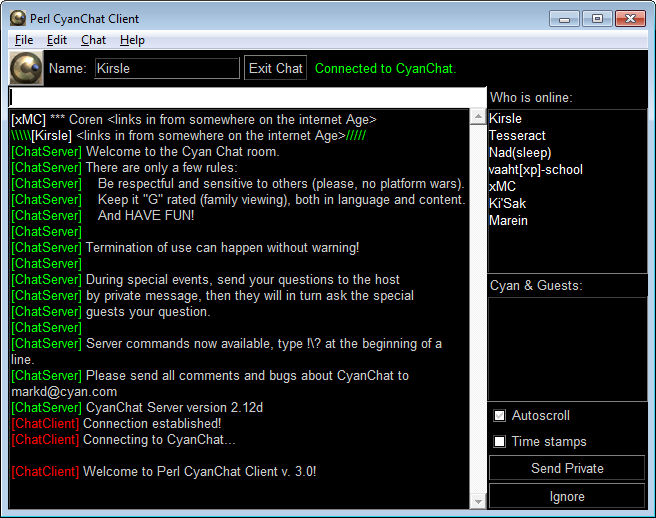
Screenshot
PCCC 3.0 running on Windows 7 Beta.
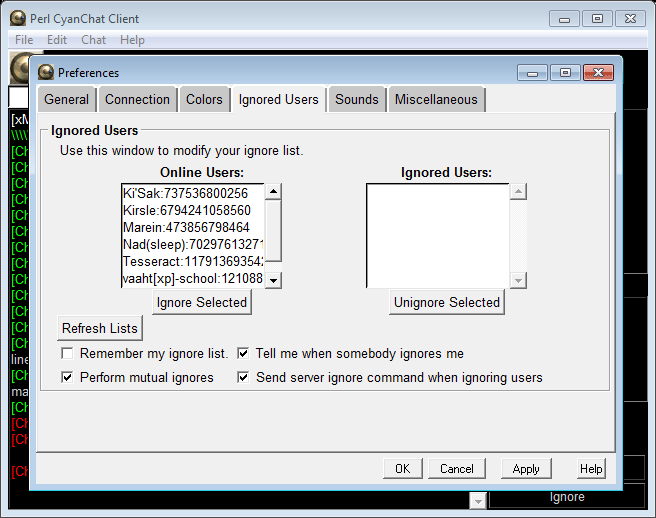
Screenshot
Ignore List preferences on Windows 7 Beta.
 
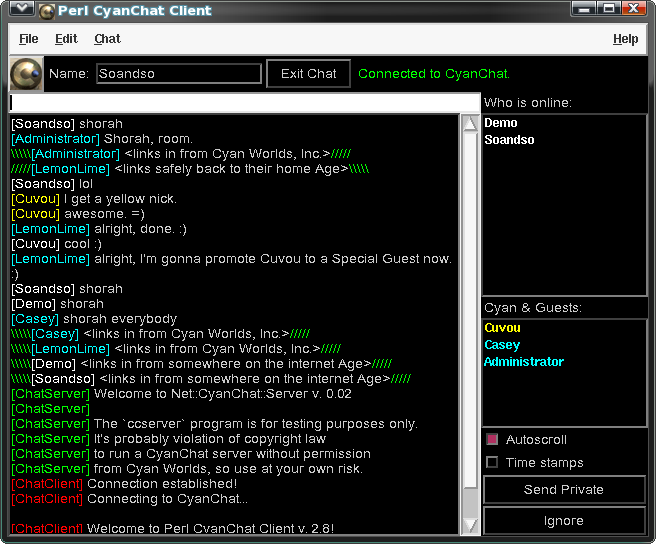
Screenshot
Linux: PCCC connected to a local CyanChat server,
demonstrating the colors of Cyan Admins and
Special Guests.
 
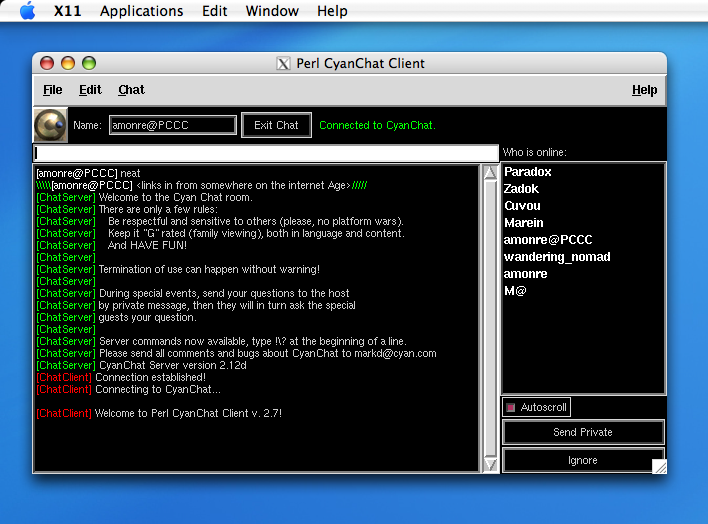
Screenshot
PCCC running on Mac OS X using X Windows.
Screenshot credit: Amonre
 
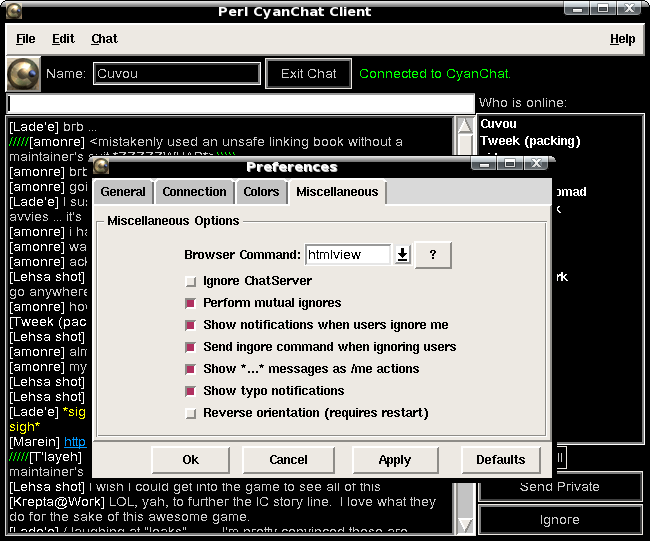
Screenshot
Linux: A tab from the Preferences window.
 
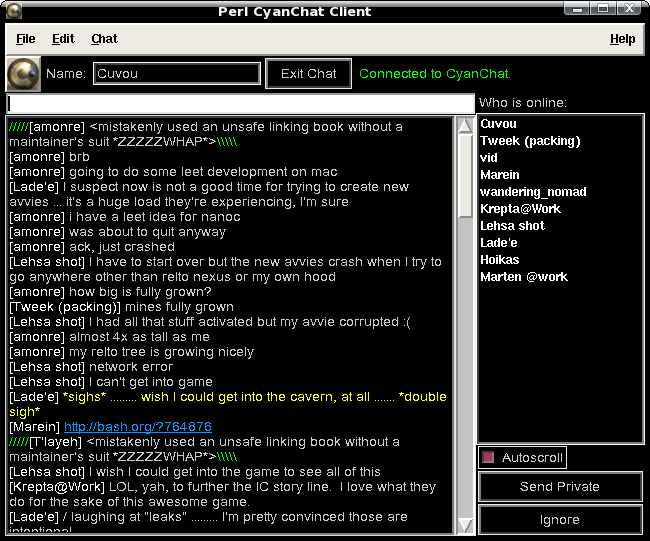
Screenshot
Linux: PCCC in action.
 
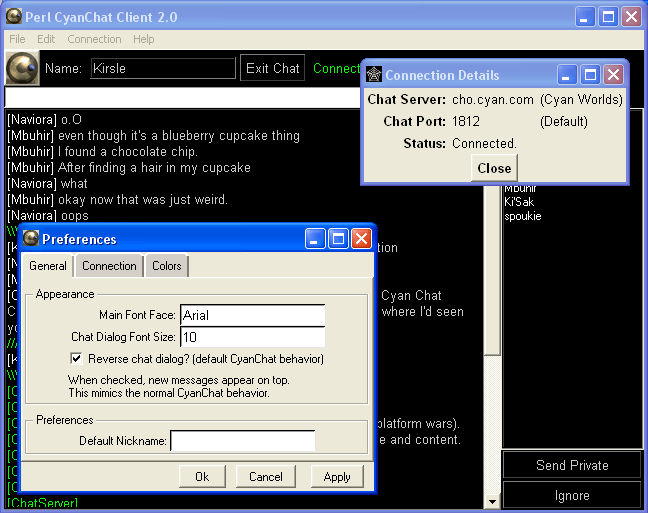
Screenshot
Windows XP: PCCC with a couple dialog windows open.
 
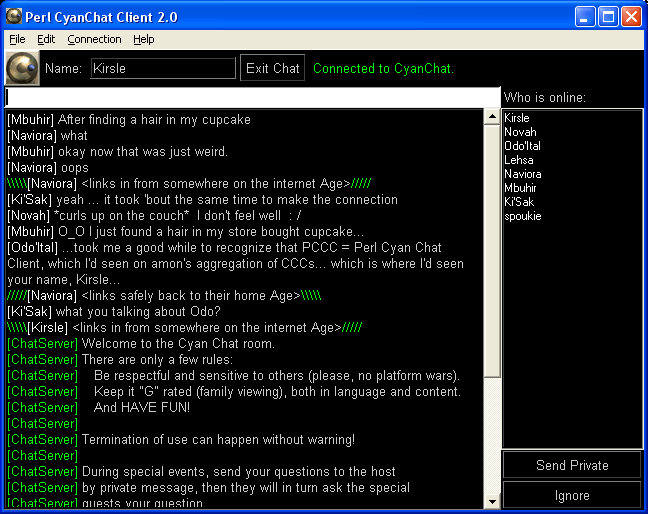
Screenshot
Windows XP: PCCC 2.0's main window.

Software License

    Perl CyanChat Client
    Copyright (C) 2008  Casey Kirsle

    This program is free software; you can redistribute it and/or modify
    it under the terms of the GNU General Public License as published by
    the Free Software Foundation; either version 2 of the License, or
    (at your option) any later version.

    This program is distributed in the hope that it will be useful,
    but WITHOUT ANY WARRANTY; without even the implied warranty of
    MERCHANTABILITY or FITNESS FOR A PARTICULAR PURPOSE.  See the
    GNU General Public License for more details.

    You should have received a copy of the GNU General Public License along
    with this program; if not, write to the Free Software Foundation, Inc.,
    51 Franklin Street, Fifth Floor, Boston, MA 02110-1301 USA.

Readme

+--------------------------+
| Perl CyanChat Client 2.x |
+--------------------------+

I. About PCCC 2.x
-----------------

	Perl CyanChat Client 2.x is a complete rewrite from the original
	1.x versions. The new client uses Net::CyanChat to connect to
	the CyanChat servers instead of having the code included within
	PCCC's own code.

	PCCC 1.x was actually written prior to Net::CyanChat which I
	created AFTER making PCCC 1.x, so the new PCCC makes up for that.

II. About CyanChat
------------------

	If you don't know what CyanChat is, then I'm wondering why you
	downloaded PCCC. CyanChat is the name of a chat room which is owned
	by Cyan Worlds, Inc. (formerly known simply as Cyan). They created
	some really good adventure games named Myst and Riven (and Myst III
	and then Myst IV and V too), as well as a few other spinoff games
	such as Uru and RealMyst.

	The chat server was programmed by Mark Deforest of Cyan Worlds. The
	chat room was created so that fans of Cyan could have a place to
	meet and discuss their games and novels and interact with other fans.
	The "CyanChat Community" is made up of a small number of members who
	have been with CyanChat for years and years (I first went to CyanChat
	like six years ago and the same group of people are still here today!)

	That being said, if you didn't know what Cyan was or haven't heard
	of Myst or Riven, you probably shouldn't be on CyanChat because the chat
	community there might not accept you very well.

	The official homepage to CyanChat is:  http://cho.cyan.com/chat/

III. CyanChat Rules and Policies
--------------------------------

	Official Rules Page: http://cho.cyan.com/chat/rules.html

	* Be respectful of and sensitive to others.
	* Please, no platform wars ("my computer is better than yours").
	* Keep it "G" rated; in other words, suitable for family viewing.
	* No flooding, in other words, filling the screen with junk.
	* But most of all HAVE FUN!

	A. Impersonating
	----------------
		No name or handle is reserved for any one person.
		However, purposely impersonating someone for personal
		gain or in disrespect of the person being impersonated
		will not be tolerated. So, please try to find a
		unique name for yourself.

	B. Being Banned
	---------------
		The CyanChat server has a bad language filter that
		watches all the messages being sent. If it detects
		that you have used bad language, depending how severe,
		it might automatically ban you from using CyanChat,
		ban you for a day or just censor the message. Once
		you have been banned you will get a message when you
		start CyanChat that your IP address has been blocked
		from using CyanChat.

	C. Getting Unbanned
	-------------------
		There are many reasons why an IP address might be banned
		from CyanChat, some reasons are accidental, such as misspelling
		a word. If you've gotten accidentally banned, e-mail markd\@cyan.com
		with the IP address that is banned. But one thing to
		remember is that I have a log of all the bannings (and what
		was said) and its usually quite obvious, so don't try the
		"accident" angle unless it really was.

IV. Configuring PCCC
---------------------

	After running PCCC for the first time, you can configure CyanChat
	by choosing "Edit -> Preferences". The client assumes a number of default
	preferences, which you can change. If you want to restore them to their
	defaults, either delete "config.txt" and restart the program, or click
	"Restore Defaults" in the preferences window.

V. Using PCCC
--------------

	When you open PCCC, it should connect automatically unless you specified
	that it shouldn't. In that case, click "Connection -> Connect" on the menu
	bar to connect to CyanChat.

	When connected, you will receive a lot of messages from ChatServer. These
	are introduction messages.

	Type a nickname for yourself in the box next to the word "Name:" toward
	the top of the window. Then click "Join Chat" to enter the room. Note that
	nicknames can be no longer than 20 characters and that they can't contain
	the pipe symbol "|".

	Write messages into the long text box above the chat dialog space. To send
	a private message to somebody, there are three options you can use:

		1. Write a message into the normal message space, then single-click
                   the target's name from the Who List, and click "Send Private"
		2. Double-click a user's name from the Who List to open a Private
                   Message window. Type your message into this window and hit Enter.
		3. In the normal message space, type "/whisper <name> <message>",
                   substituting a user's name for <name> and a message for <message>.

	To exit the chat room, click the "Exit Chat" button. To disconnect from
	CyanChat, click "Connection -> Disconnect". Doing this will also sign you
	out if you are currently signed in to the chat room.

	Exiting PCCC via "File -> Exit" will also sign you out and disconnect you
	where applicable. Closing out of the program in any other means will result
	in a "disconnect", where CyanChat will simply tell the other users that you
	were disconnected rather than that you signed out properly.

VI. Installation
----------------

	Perl CyanChat Client should work fine on all operating systems. It mostly
	uses the standard Tk modules from Tk version 804.027

	In addition to the standard Tk modules, the following nonstandard modules
	may need to be installed:

		Net::CyanChat 0.04 or higher.

	These modules have been included in the standard distribution of
	Perl CyanChat Client.

VII. License and Copyright
--------------------------

    Perl CyanChat Client
    Copyright (C) 2008  Casey Kirsle

    This program is free software; you can redistribute it and/or modify
    it under the terms of the GNU General Public License as published by
    the Free Software Foundation; either version 2 of the License, or
    (at your option) any later version.

    This program is distributed in the hope that it will be useful,
    but WITHOUT ANY WARRANTY; without even the implied warranty of
    MERCHANTABILITY or FITNESS FOR A PARTICULAR PURPOSE.  See the
    GNU General Public License for more details.

    You should have received a copy of the GNU General Public License along
    with this program; if not, write to the Free Software Foundation, Inc.,
    51 Franklin Street, Fifth Floor, Boston, MA 02110-1301 USA.

Revision History

+--------------------------+
| Perl CyanChat Client 2.0 |
+--------------------------+

3.0  Jun 21 2007
     - Made some changes to the Debug Window:
       - The output filehandles (STDOUT; STDERR) are no longer bound to this window; they're
         sent to the terminal (if present) like default.
       - Only CC packets are displayed in the Debug Window. Server packets are in blue text,
         and client packets are in red.
     - Changed the default Special Guest color back to orange, and the action color back
       to yellow.
     - Built in support for "profiles." Your configuration, ignore lists, and chat logs
       are now saved in your home directory instead of in PCCC's directory. So on Linux
       this means /home/username/.pccc, and WinXP is C:/Documents and Settings/user/PCCC
     - Made a minor edit to the Net::CyanChat library, so that it can detect when the
       server has banned you from the room.
     - Added support for sound effects. It uses the Win32::MediaPlayer module on Windows,
       or the system command `play` on Linux.
     - Added a "Force Quit" command under the File Menu. It's disabled by default. When
       you attempt at least once to exit the program properly, and it for whatever reason
       fails to exit, the Force Quit option becomes enabled. Alternatively, the keyboard
       shortcut Ctrl+Alt+Q will kill the program.
     - Moved the configuration options for MutualIgnore, LoudIgnore, and SendIgnore to
       the bottom of the "Ignored Users" tab.
     - Created a "Sounds" tab, with configurable options for:
       - Enable sounds -- disable this, and all sounds are disabled.
       - Play sounds on certain events...
         - When a user joins the room
         - When a user exits the room
         - When a public message is received
         - When a private message is received
     - Added a "Mute sounds" option to the bottom of the Chat menu. This option will
       temporarily disable sounds, but not permanently save this state to your config
       file.
     - Changed how action messages ("/me") and typo messages appear. The new style is:
       Action Messages:   ** Nickname performs an action **
       Typo Messages:     [Nickname] *their typo correction
       All the text is in the action text color except for the nickname, and in the case
       of typo messages, the brackets around the nick. In typo corrections, the user's exact
       message is shown as usual, just in yellow text instead of silver.
     - Reprogrammed the entire help system. It now uses Tk::HyperText and renders HTML
       documents from the "docs" folder. Also, added an "About" menu option to the Help menu,
       which opens the appropriate page in the Help Viewer. Also, "Help" buttons on the
       Preferences window will load the appropriate page in the Help Viewer too.
     - Bug fix: when copying/pasting text from an outside source (e.g. from a web page)
       into the typing space, the newline characters would be preserved when they shouldn't
       be. Sending the message would result in getting banned from Cho. This has been fixed
       now, as the characters \x0d (Cr) and \x0a (Lf) are filtered out of your message.
     - Bug fix: got rid of the right-click context menus on the Who List. For Windows users,
       right-clicking and bringing up this menu would pause the main program loop, effectively
       preventing PCCC from polling the server for new events. The GUI would still work just fine,
       but the loop wouldn't work anymore.

2.8  Jun  1 2007
     - Removed the "highlight borders" on the widgets, so that Linux and Mac users don't
       have to see those ugly borders around i.e. the "Autoscroll" check box, as well as
       buttons and text boxes.
     - Redesigned the preferences window.
     - Added the option of *not* showing private messages in new IM windows. When the
       option is disabled, private messages only show up in IM windows if an IM window
       already exists, and the only way to create an IM window is to double-click a name
       in the Who List.
     - Added right-click context menus to the Who List. Right-clicking a user displays a
       context menu along the lines of:
          Username:address
          ----------------
          Send private message
          Ignore user
       ... or "Unignore user" if you already ignored them.
     - Added an "Ignored Users" tab to the Preferences window, where you can view your
       ignore list, adding or removing users if necessary.
     - Added "Notifications" -- when a new message arrives (in public chat or private
       message windows), and the window is out of focus or minimized, the window title
       will animate to get your attention.
     - Added an "Auto-logging" option, which will automatically log all messages received
       in chat. It saves them into "./logs/yyyy-mm-dd/yyyymmdd-x.html", where yyyymmdd is a
       date stamp, and x is a session number starting from 1, which increments each time PCCC
       is run.
     - Bug Fixes:
       - Fixed the "disappearing name" bug (where you'd log in to chat, open the Preferences
         window, hit Cancel, and your nick in the Name: box would revert to the "default nick"
         from the preferences, which is blank by default).
     - Added configuration options:
       - TimeStamps: show time stamps on all messages.
       - IMWindows: show private messages in new "IM" windows

2.7  May 23 2007
     - The client now assumes "htmlview" as the default "Browser Command" when you're not
       on Windows and there is no config file yet. Otherwise, the default is "start"

2.6  Apr 14 2007
     - Added the "Browser Command" option, to specify the console command used to open your
       web browser. Windows users can just leave this as "start", but Linux users will have
       to specify "firefox", "mozilla", or another command.
     - Added a "Reverse Orientation" option. Users that are familiar with most traditional
       chat programs, in which the message typing space is below the conversation space,
       will want to enable this option (in conjunction with unchecking "Reverse chat dialog").
     - Made the Preferences and Enter Raw Command windows a little bit bigger. The "Ok"
       button was being squished on Linux, and the Enter Raw Command's buttons weren't even
       visible before.
     - Updated the help file with information about the new options added.

2.5  Mar  1 2007
     - Two more Frame widgets added to the user interface. Now the window "scales" better
       (when you maximize the window, the input box stays at the top and the dialog window
       stretches to fill all the remaining space; previously, the dialog window and input
       box would fight for the new space, causing a lot of unnecessary padding above and below
       the input box).
     - Added hyperlinking support for the main chat dialog window (but not yet for private
       message windows).

2.4  Jan 29 2007
     - Added a checkbutton to enable/disable the automatic scrolling of the chat window when
       new messages are received.
     - The "Disconnect" menu option is disabled from the start if you are not connected yet,
       like it should've been.
     - The Who List gets wiped clean when you disconnect from the server. The lack of doing this
       used to cause problems where people in the Who List weren't actually in the chat room,
       so clearing the list fixes this problem.
     - Made sure I don't forget to include the latest version of Net::CyanChat in the source
       distribution this time. ;)

2.3  Nov  7 2006
     - Minor bug fixes.

2.2  Oct 30 2006
     - Added more color variables: the main window background/foreground and the button
       background/foreground is now configurable separate from the rest of the screen.
       The WhoList can have a different background than the dialog window.
     - The "Save Transcript" now saves the conversation as XHTML, keeping the colors of the chat.
       If you save it to a text file, it ignores the formatting (the old behavior of PCCC).
     - Action messages have changed display formats:
         Old Way: *** [username] action ***
         New Way: [username] action in yellow ("action") text color
     - Outgoing private messages are echoed in the chat dialog window, even if you sent them in
       a separate PM window.
     - Added some new configuration options:
       - AutoAct: when a message starts and ends with *'s, it will be treated like a /me action.
       - LoudTypo: when a message starts with a * (typically for typo corrections), a notification
         will be shown about the typo being corrected.
     - Added a full documentation system. Click "Help -> Contents"
     - Bug fixes:
       - Private message windows now auto-scroll.

2.1  Oct 24 2006
     - Added new configuration options:
       - AutoJoin:    automatically join the room on connect (if Nickname has a length)
       - BlockServer: ignore private messages from ChatServer (when on debug port 1813)
       - LoudIgnore:  show a notification when somebody blocks you
       - SendIgnore:  send the ignore command to the server when you ignore somebody
       - IgnoreBack:  perform a mutual ignore when ignored (ignore the one ingoring you)
     - Added the ability to reset the configuration to the defaults.
     - The entire window now recolors itself when you change color settings (rather than just
       the conversation window)
     - A disconnect handler has been added so the client knows when you've been disconnected
       from the chat server.
     - Added the ability to automatically reconnect on disconnect. This functionality is limited
       though. It won't keep trying. But this will solve the quick temporary disconnects experienced
       on wireless Internet connections.
     - A few bugs have been fixed:
       - The Preferences window now has a fixed default width and height. Previously, it
         was leaving it up to the window contents to automatically adjust its size, but this
         didn't work on *nix platforms and the window was too small.
       - The "Connection Details" window has a fixed default width and height too, for same reasons.
       - Private Message windows will come back now. Previously, if you opened a private message
         window with somebody, then closed that window, you couldn't reopen it (unless the other
         person sent you a message to open the window).

2.0  Oct  1 2006
     - Initial release.

Version 1.2
     - AutoShorah eliminated completely, its bad for CyanChat.
     - Added a link back to CyanChat Home to the Help menu.

Version 1.1
     - Fixed "Save Logs As..." feature.
     - Hyperlinking added.
     - AutoShorah now is more limited to be less annoying.
     - External configurable file included.
     - Optional "connect on startup" now.
     - Added "Connection" menu for modifying your connection.
     - Fixed bugs with changing nickname

Version 1.0
     - Initial Release

Downloads

It's recommended that you download the latest version of this software as listed below. To download older versions and source code, skip to the next section.

Windows Executable

Win32 Download Perl CyanChat Client
Version 3.0 - 2007/06/21
ZIP format/2.3 MB

Linux Binary

Linux Download Perl CyanChat Client
Version 3.0 - 2007/06/21
TAR.GZ format/4.7 MB

All Distributions

The following are all the distributions available for this software, starting with the most recent. Source code is also available for all versions.

Release Windows EXE Linux Binary Source Code
3.0
2007/06/21
Win32 PCCC 3.0
(ZIP; 2.3 MB)
Linux PCCC 3.0
(TAR.GZ; 4.7 MB)
Perl Source PCCC 3.0
(TAR.GZ; 175 KB)
2.8
2007/06/01
Win32 PCCC 2.8
(ZIP; 2.2 MB)
Linux PCCC 2.8
(TAR.GZ; 4.6 MB)
Perl Source PCCC 2.8
(TAR.GZ; 48.7 KB)
2.7
2007/05/23
Win32 PCCC 2.7
(ZIP; 2 MB)
Linux PCCC 2.7
(TAR.GZ; 4.5 MB)
Perl Source PCCC 2.7
(TAR.GZ; 42 KB)
2.6
2007/04/14
Win32 Not available. Linux Not available. Perl Source PCCC 2.6
(TAR.GZ; 40.7 KB)
2.3
2006/11/07
Win32 PCCC 2.3
(ZIP; 3.2 MB)
Linux Not available. Perl Source PCCC 2.3
(ZIP; 31.2 KB)
2.1
2006/10/24
Win32 Not available. Linux Not available. Perl Source PCCC 2.1
(ZIP; 23.5 KB)
2.0
2006/10/01
Win32 Not available. Linux Not available. Perl Source PCCC 2.0
(ZIP; 21.2 KB)
1.2
2005/07/19
Win32 PCCC 1.2
(ZIP; 3.2 MB)
Linux Not available. Perl Source PCCC 1.2
(ZIP; 16.2 KB)
Kirsle
» Homepage (RSS)
» About Me
» Photo Albums
» Guestbook
» Contact Me
Channels
» Linux (46)
» General (43)
» Perl (34)
» Rant (20)
» Software (15)
» RiveScript (9)
» Gnome 3 (8)
» HowTo (8)
» Windows (8)
» HTML (7)
» Android (6)
» Design (6)
» Siikir (6)
» Tk (6)
» Curiosity (5)
» Blackhat (4)
» Gay (4)
» Java (4)
» Reviews (4)
» VirtualBox (4)
» DOS (3)
» KAGE (3)
» Licensing (3)
» Photos (3)
» Xfce (3)
» ttf2eot (3)
Creativity
» 3D Renderings
» Flash Animation
» JavaScript
» Fonts
» Metacity
» Tutorials
Software
» RiveScript
» Error Generator
» Tk Calculator
» Terminal Apps
» CyanChat Client
Web Tools
» TTF to EOT
» Text Fader
» Favicons
» Distance Calc
» Azulian Encoder
» XBM Masks
Subdomains
» Shell Scripts
» Linux RPMs
» Kirsle::Nano
» Minecraft Server
Miscellany
¤ Pokemon Fuchsia City
¤ DOS and Windows
¤ Raspberry Pi
Links
¤ Google+
¤ Facebook
¤ New MySpace
¤ Twitter
¤ Github
¤ CPAN
Fan Club
» Log In
» Sign Up

Stats
-= Today =-
> Total hits: 2155
> Unique: 1349
-= All Time =-
> Total hits: 1333681
> Unique: 122048
» Traffic History
» Referrers